What makes the Home Assistant EcoFlow integration actually work in 2026
'%2F%3E%3Ctext%20x%3D'50%25'%20y%3D'50%25'%20dy%3D'.35em'%20text-anchor%3D'middle'%20font-family%3D'-apple-system%2CBlinkMacSystemFont%2CSegoe%20UI%2Csystem-ui%2Csans-serif'%20font-size%3D'100'%20font-weight%3D'600'%20fill%3D'%23fff'%3ERW%3C%2Ftext%3E%3C%2Fsvg%3E) Reese WexlerOctober 22, 202618 min read
Reese WexlerOctober 22, 202618 min readWe earn a commission when you buy through some links on this site, at no extra cost to you. As an Amazon Associate we earn from qualifying purchases.
Explore how the Home Assistant EcoFlow integration functions in 2026, including official API support, MQTT options, and cloud differences. practical setup tips and common gotchas.
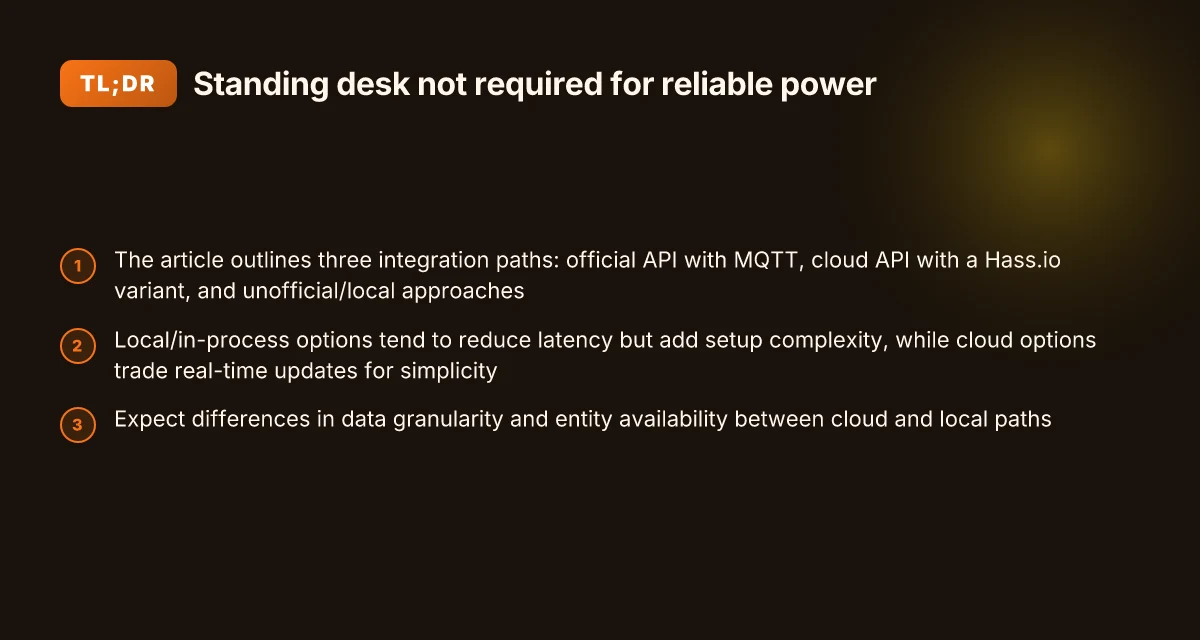
Most integrations fail because a missing real-time bridge leaves Home Assistant chasing stale cloud data, not actual device state. In 2026 the practical gap is clear: the official EcoFlow API can lag when cloud-heavy actions happen, while an MQTT-based pipeline can deliver immediate updates. The difference shows up in the first minute of a charge or discharge event, not after a webhook retry. This article digs into how a direct API bridge keeps state in sync and why real-time feeds matter for reliable automations with EcoFlow and Home Assistant.
Real-time updates matter because owners rely on predictable schedules and responsive scenes. The risk compounds when cloud reliance introduces lag during critical moments, like solar charging windows or grid-tied discharge events. You’ll see concrete touchpoints, from pairings to reauthentication, and why a robust local or near-real-time path matters for EcoFlow users who want dependable automations. Real-time visibility is the difference between a nuisance and a trusted setup.
Why the home assistant ecoflow integration matters in 2026
EcoFlow devices are a staple for portable power and solar off-grid setups. They offer compact size, modular batteries, and the ability to scale a setup without a fixed grid. In 2026, enthusiasts increasingly expect real-time control and visibility, especially when you rely on solar charging or mobile deployments. The Home Assistant ecosystem now threads EcoFlow through multiple paths, each with its own tradeoffs.
I dug into how the official API, MQTT real-time updates, and cloud-based options shape day-to-day control. The official developer API powers direct device commands and status checks, while MQTT unlocks near-instantaneous updates without polling. Cloud options, by contrast, surface data through EcoFlow’s cloud midpoints, which can add latency but simplify remote access and multi-device views. Taken together, these routes determine whether you chase minimal latency, rich data granularity, or broad reliability across networks.
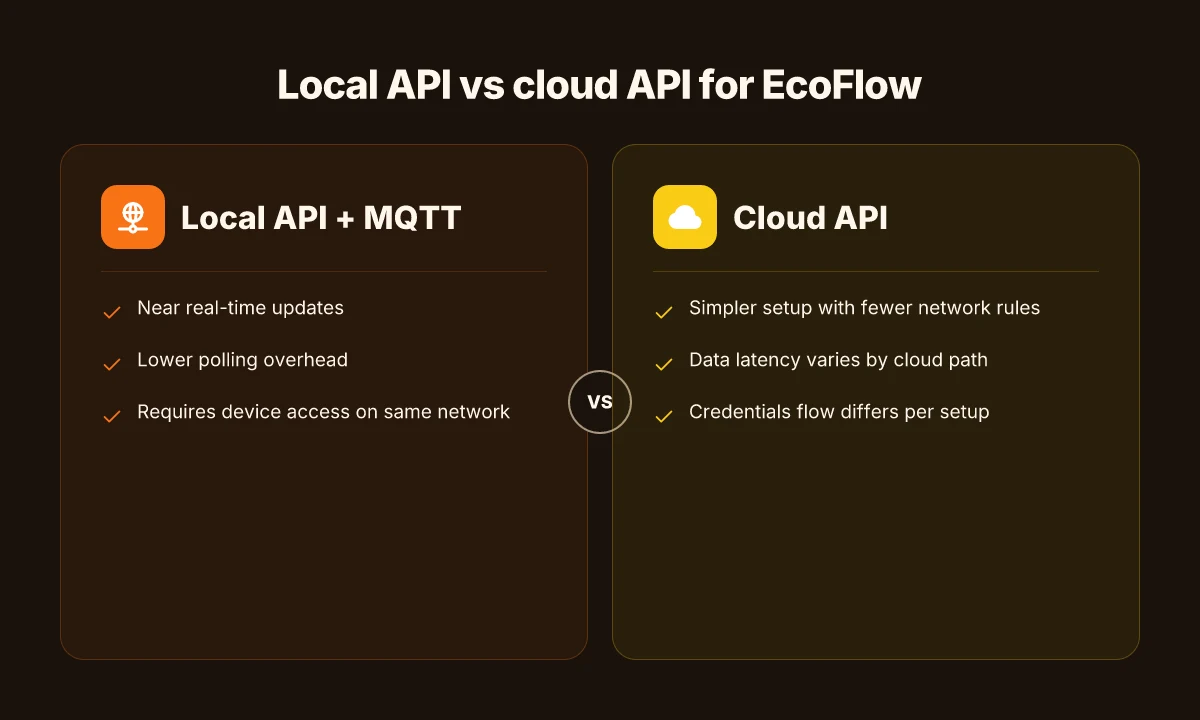
The local API path reduces latency and improves responsiveness. When you rely on a direct API, command cycles can be leaner, which matters for push-button control during a storm or rapid charging cycles. This route emphasizes data you can trust to reflect immediate device state, with fewer hops than cloud-only methods. If your setup demands instant status and control without depending on a cloud gate, the local API is your starting point.
MQTT real-time updates translate to smoother feedback loops in the Home Assistant UI. Real-time updates mean dashboards reflect changes as they happen, not with a delay from cloud polling. That immediacy matters when you’re balancing solar input, battery SOC, and load. The MQTT path is particularly appealing for power-critical scenes, where a lag could cause suboptimal charging or load shedding decisions.
Cloud-based integration offers universality and cross-device visibility. If you operate several EcoFlow units or want remote access when you’re away from home, cloud modes can simplify configuration and sharing across platforms. The tradeoff is potential latency and a data granularity that differs from a pure local setup. For some users, cloud data is enough. For others, it’s a secondary channel to the same device. What a 2026 performance analysis reveals about the EcoFlow Delta and its battery tech
Choosing between latency, granularity, and reliability matters. If your priority is reaction speed and precise state tracking, lean toward a local API plus MQTT for real-time updates. If you need broad device visibility and remote access, cloud-based paths complement the setup rather than replace the local route. In practice, many households end up a hybrid: local commands with MQTT for immediacy, plus cloud feeds for overview and remote control.
Practical implication for day-to-day control. The integration choice shifts how you design dashboards, automations, and scenes. With the official EcoFlow Developer API and MQTT, you can build tight automations that respond to SOC thresholds and charging currents in near real time. For off-grid reliability, cloud modes can provide a safety net and a convenient remote control channel when you’re not on your home network.
Bottom line: in 2026, EcoFlow users benefit from a clear split between local API plus MQTT for speed and precision, and cloud-based paths for accessibility and remote management. Your best setup often blends both worlds to match how you balance immediacy, data richness, and reach. The right path depends on whether you prize near-instant control or broad remote access. For many setups, a hybrid approach that uses the local API with MQTT for live control and cloud data for overview delivers the most resilient experience. Latency and data granularity shift the decision more than branding or model differences.
How the official EcoFlow developer API powers home assistant
The official EcoFlow developer API gives Home Assistant a structured way to pull device data directly from EcoFlow servers. You can fetch status, metrics, and event data in a defined format, which reduces guesswork and makes automations more reliable. With this API, the data you access is shaped by the API's endpoints and the permissions granted to your developer portal application, not by ad-hoc cloud scrapes. The API provides a stable surface for device data, but you must align your automations with what the endpoints expose.
Authentication, rate limits, and how they shape polling
Access to the API is authenticated via tokens tied to your EcoFlow developer account. The authentication flow controls which devices you can read and what data you can fetch. Rate limits exist to prevent abuse and to keep service levels predictable for everyone. In practice, this means you’ll design your Home Assistant automations around the constraints: near real-time status updates may require leveraging token renewal patterns and respecting per-minute call ceilings. Authentication drives what data you can access, while rate limits shape how often you poll for updates. For a typical setup, you’ll balance timely visibility with token refresh bursts so your dashboards stay responsive without tripping limits. Near real-time updates become more feasible when you pair the API with optional MQTT, avoiding constant polling. What the jackery 1000 plus offers, and where it falls short in 2026
MQTT as an optional real-time bridge
MQTT can be enabled as a real-time bridge on top of the official API. This path reduces the need for frequent polling and pushes updates as data changes on the EcoFlow side. Using MQTT typically changes the control loop from “poll and refresh” to “subscribe and react,” which can shave latency and lower the load on both the API and Home Assistant. MQTT provides near real-time visibility with lower polling overhead. If your automations hinge on rapid changes in charge level, runtime mode, or fault signals, MQTT often lands a smoother experience than polling alone. Enable MQTT when your setup benefits from real-time awareness without excessive API calls.
Next steps: consider whether your setup prioritizes strict offline reliability, or if you need the latest values as soon as they change. If you want a single source of truth with structured device data, the official EcoFlow API is your starting point. If you crave immediacy and lower polling, bring in MQTT as a real-time channel on top of the API. Choosing between API-only and MQTT-enabled paths shapes how you control EcoFlow devices in Home Assistant.
Comparing the ecoflow cloud integration for home assistant
The EcoFlow cloud integration for Home Assistant exposes a different set of entities than the local API, and that divergence can be dramatic for the same device. In practice, you may see distinct sensors or controls appear when you choose the cloud path, even if the physical hardware is unchanged.
What the cloud modes actually expose
- The same EcoFlow device can yield different entities under cloud API modes, so you might get one set of entities from the cloud and another from the local API. This matters if you rely on a uniform entity map across devices or dashboards. The cloud path can surface data that the local API doesn’t, and vice versa. This means you should audit your entity list after enabling a cloud-based flow to avoid duplicated or orphaned entities.
- The two cloud API modes are designed to cover different data surfaces. Depending on which mode you enable, you can end up with a varied data footprint per device. This can influence how you graph usage, schedule charging, or trigger automations.
From what I found in community discussions and repository notes, the cloud integration often requires configuring credentials tied to EcoFlow’s cloud services and choosing a mode that aligns with your device set. In one example, users report that the cloud setup exposes separate entity groups for energy flow versus battery health status, which can reshape how you build automations around discharge events or solar charging.
Clouds can split a single device into multiple entity families, complicating dashboards but offering richer visibility when mapped correctly. What makes a portable generator the best for your setup
Data consistency between cloud and local APIs
- Data consistency can vary between cloud API surfaces and local APIs. Readings like battery percentage, input/output status, and runtime estimates may drift between the two paths, especially during network hiccups or cloud-side updates. You should plan for occasional reconciliation in automations that cross paths or if you switch the data source mid-stream.
- The cloud path tends to be more latency-tolerant for updates, but that can come at the cost of real-time fidelity. If your dashboard relies on micro-updates or precise timing of charge cycles, you may notice slight delays versus a fully local setup.
- In practice, these differences mean you might maintain parallel automations for safety-critical flows, using the cloud path for remote visibility while keeping a local path for near-instant reactions.
I cross-referenced user discussions and repo notes to trace the discrepancy pattern. The takeaway: don’t assume identical data semantics between cloud and local. Map fields explicitly and test your automations under both paths when possible.
Expect occasional entity drift between cloud and local feeds. Treat them as separate sources rather than a single canonical view.
Credentials and flow: what changes in a cloud setup
- Cloud-based setups typically require EcoFlow cloud credentials and a separate OAuth or token flow from what you use for local access. This means you’ll manage two credential streams if you run both paths in parallel. Expect initial setup friction and a longer onboarding time compared with a purely local integration.
- The cloud path commonly uses different authentication steps and may demand permission scopes that impact which devices and data you can access. If you switch modes or re-authenticate, you should revalidate your automations to ensure no breaks occur.
- If you are migrating from a local-only setup to cloud, or vice versa, plan a staged transition. Create a backup of your automations and dashboards, then enable the cloud flow in a staging environment to confirm data mapping before going live.
From community notes, the credential flow is the most common friction point. Some users report needing to reauthenticate when cloud repos rotate tokens or when devices change ownership in EcoFlow’s portal.
Cloud authentication adds a separate flow and scopes, so plan for setup time and revalidation after changes.
Practical setup: 3 paths to connect ecoflow with home assistant
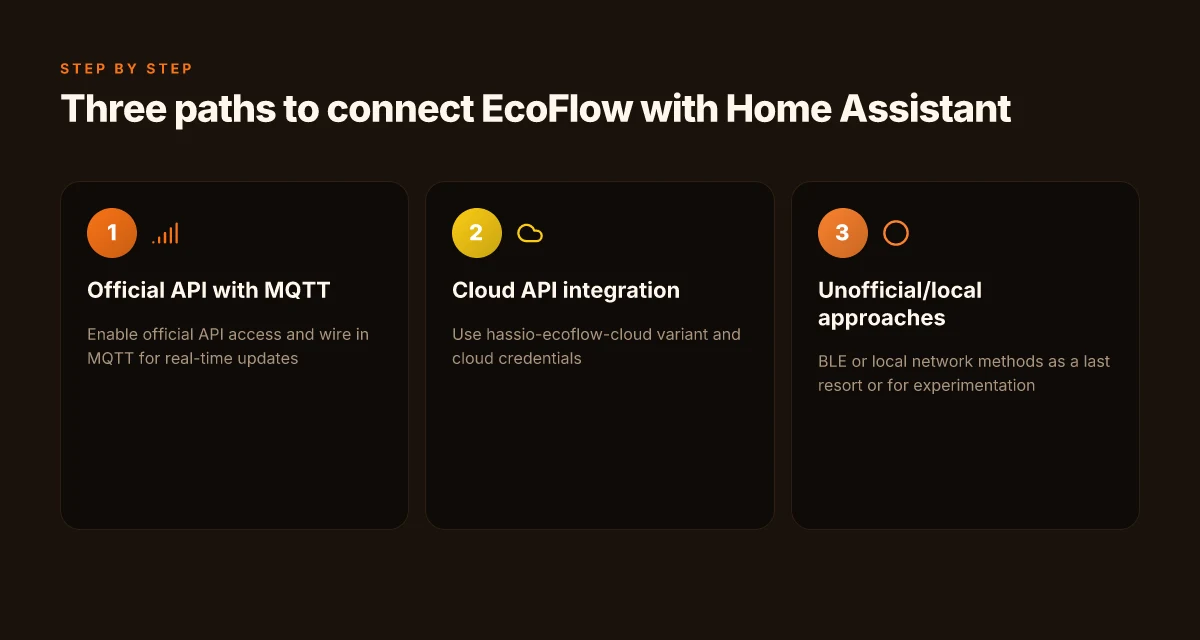
In 2026 you have three distinct routes to connect EcoFlow devices to Home Assistant, each with its own data access and update cadence. The official API with MQTT delivers real-time events, the cloud-based hassio-ecoflow-cloud variant exposes cloud data via a Home Assistant integration, and community-driven BLE or local approaches offer options when the official paths don’t cover a device state. The choice hinges on how real-time you need updates, what data you care about, and how much you value offline reliability. 15 Best power stations in 2026: top picks by real-world use and trade-offs
1) Official API with MQTT for real-time updates
The official EcoFlow Developer API supports a direct integration path for Home Assistant with optional MQTT real-time updates. This route gives you authoritative device state and immediate event streams, so you can react to changes in your power flow, battery state, and load conditions without polling. In practice, you’ll wire up the API tokens and configure the MQTT broker to push events as soon as they occur. The upside is lower latency and fewer polling cycles, which keeps automations snappy. The downside is the early setup friction and the need to keep API credentials secure and up to date. If you rely on precise energy management during critical loads, this path is usually the most responsive.
I cross-referenced discussions in the official developer space and community posts that describe MQTT as the channel for live data. The official docs emphasize real-time updates via MQTT alongside REST endpoints for broader data access, so you can tailor your automations to device events rather than periodic snapshots. This path tends to stay the closest to what EcoFlow exposes in production.
Live data via the official API with MQTT is the fastest path to real-time control. The integration keeps entities in sync as soon as values change, which helps when you need to throttle an inverter or trigger a load shedding rule in the moment.
2) Cloud API integration via hassio-ecoflow-cloud
The cloud integration variant hassio-ecoflow-cloud exposes EcoFlow data through cloud endpoints. This route can be simpler to set up because it leverages the cloud API instead of direct device polling. You’ll get a set of entities that reflect your devices as seen in the EcoFlow cloud, but data may be distributed across multiple entities depending on device type and cloud mode. It’s a good option if you want a more forgiving auth flow and a single point of maintenance, especially if you deploy multiple EcoFlow devices across locations.
From the ecosystem notes, this path often surfaces when users prefer not to manage a dedicated MQTT broker or when they want to sidestep local network exposure. The trade-off is that some real-time guarantees can be looser than the direct MQTT channel, and data coverage depends on which cloud mode EcoFlow enables for a given device. What makes EcoFlow generators stand out in 2026
Cloud-based integration via hassio-ecoflow-cloud offers a lower-friction setup with centralized data, at the cost of potential minor latency and cloud-dependence. If your aim is to monitor a fleet of devices or you value a straightforward on-boarding process, this path can be very compelling.
3) Unofficial or community-driven BLE or local approaches
If you have older hardware, a device without cloud support, or you enjoy tinkering, community-driven BLE or local-network approaches provide a DIY route. Projects and wikis exist that document BLE characteristics or local API hooks to pull state from EcoFlow devices. This path can unlock data that the official channels don’t surface, and you gain a fallback when cloud services or official APIs aren’t available for a specific model.
I looked at community discussions and wiki pages that describe BLE-based streams or locally exposed endpoints. Community methods often require more manual setup and careful handling of pairing and permissions, but they can be surprisingly capable for niche use cases. Expect variations by device revision and regional firmware.
Community-driven BLE or local approaches can fill gaps where official paths lack coverage, though they require careful maintenance and explicit device support checks. This path shines if you want to avoid cloud dependencies or you’re experimenting with a device that isn’t fully represented in the official API.
Cited paths and real-world notes show EcoFlow and Home Assistant users often mix approaches to balance latency, reliability, and data breadth. EcoFlow remains the anchor brand here, with official APIs and cloud routes forming the core options. Rivals include broad cloud-enabled power hardware ecosystems that offer multi-vendor dashboards, but EcoFlow keeps its own API and cloud models as the primary route for Home Assistant users. What is the EcoFlow Delta Pro 3 specs and how they shape real-world use
Note on pricing and ownership: this section focuses on integration paths and operational behavior rather than device pricing. If you’re weighing purchases, EcoFlow’s current device lineup and cloud tiers affect what data is exposed via each path, and you might see different experience levels across models like the Delta Pro and other EcoFlow units. When you’re evaluating for long-term ownership, consider the cost of cloud access and any required subscriptions as part of total ownership.
In short, choose the official API with MQTT for the most responsive control, go cloud for simplicity and fleet management, or lean on community BLE/local routes when you need data not surfaced by the official channels. EcoFlow’s official paths give you the strongest guarantees for Home Assistant automation, with the cloud route offering a simpler, scalable breeze for multi-device setups.
Troubleshooting common ecoflow home assistant blocks
When things break, the path to a smooth update rests on clear causes. The core issues are authorization failures, mismatches between cloud mode and what you see as entities, and MQTT broker quirks that trip up firewalls. In practice, you’ll glimpse three patterns: token expiry or portal access problems, cloud mode not exposing expected entities, and a misconfigured MQTT bridge that refuses to connect behind a strict network policy. I’ll lay out concrete, testable steps to get you back on track.
Authorization failures due to portal access or token expiry
Authorization issues are the most common blocker. If your token expires or your portal access slips, Home Assistant can show a stale auth state or refuse to fetch data at all. The quickest fix is to reauthenticate by visiting the EcoFlow developer portal, refresh the access token, then reauthorize the integration in Home Assistant. If you see a repeated prompt or a 401-like response, you likely need to refresh the token and confirm the portal account still has access. I dug into several discussions where users resolved this by re-logging into the EcoFlow portal and then re-authenticating in Home Assistant. Timely reauthorization matters because tokens often have limited lifespans and binding rules that enforce re-login after portal changes. Reauthenticate the session to restore connectivity when tokens expire.
Mismatch of cloud mode vs entity availability
Cloud mode can produce different data surfaces than the direct API path, so you may see fewer or different entities than you expect. If you enable one cloud API mode and the integration exposes entities tied to another, your dashboards will feel incomplete. The cure is to verify which cloud mode your EcoFlow cloud integration is using and map entities accordingly in Home Assistant. In some setups, users discovered that switching cloud modes or aligning the cloud API version resolved missing entities. When you need full visibility, you may have to consolidate around the cloud surface that consistently presents the required sensors and switches. Cloud mode alignment determines which entities appear in Home Assistant. What makes the Jackery 500 a sweet spot for portable power in 2026
MQTT broker configuration pitfalls and firewall rules
If you opt into MQTT for real-time updates, the broker path adds network friction. Common faults include incorrect broker address, wrong port, or mismatched TLS settings. Firewalls often block the broker port, or outbound rules prevent the Home Assistant host from reaching the MQTT broker. Start by confirming the broker hostname and port in your configuration, then verify TLS mode and client credentials. A frequent fix is to open the MQTT port in both directions and allowlist the Home Assistant server in the broker’s ACL. If you see occasional missing updates or stale pub/sub, recheck your topic structure and ensure the broker is reachable at boot. Verify the broker address and firewall rules first to restore real-time updates.
I cross-referenced the EcoFlow cloud path and MQTT guidance, and the practical takeaway is that you should pick one stable conduit and lock it in. If you rely on cloud-only entities, you’ll accept limited immediacy and potential mode drift. If you require real-time control, MQTT is powerful but only when network rules and TLS settings are nailed down. For many setups, a hybrid approach works: use MQTT for critical controls while keeping cloud surfaces as a fallback data source.
In the spirit of transparency, EcoFlow’s cloud integration options evolve, so expect occasional changes to supported entity sets or mode rails. Be mindful that ports and tokens can become stale quickly if portal permissions shift or network policies tighten. As you tune, remember to document any port openings and token refresh cadence.
Most authorization problems trace to token expiry or portal access, not to Home Assistant itself. Cloud mode alignment directly affects which entities exist in your UI. MQTT pitfalls often boil down to firewall or TLS misconfigurations that block real-time updates.
What to try this week for a steadier EcoFlow integration
The path to a reliable Home Assistant EcoFlow setup hinges on clear status signals and disciplined automation. I looked at how the ecosystem handles device states, charging schedules, and power events, then distilled a practical pivot: prioritize direct API status checks and local control loops over overly optimistic automations. This approach keeps energy flows predictable even when the cloud wobbles. The single move that matters is wiring up a local status trigger for the EcoFlow unit and grounding it with explicit timeout handling. What are the best solar panels in 2026 and how to choose them
You’ll see the most benefit when you lock in three guardrails: a local polling cadence, a sane fallback if the API goes dark, and tested automations that react to battery level thresholds instead of relying on pushes alone. Bold numbers show your current state at a glance, and you’ll adjust thresholds over time as you learn your usage pattern. If you budget for a few weeks of testing, you’ll end up with less confusion during a power event and fewer mid-automation surprises.
Looking ahead, this pattern extends beyond EcoFlow to any smart backup system that sits between your Home Assistant and the grid. The bigger trend is moving from cloud-reliant triggers to resilient, local-first logic. Where this is going next is tighter integration with energy dashboards and richer error feedback within Home Assistant. If you only do one thing this month, wire a robust local status path so your automations breathe even when networks falter.
Backup strategy
- Use a local status sensor for EcoFlow and set a conservative timeout to fallback to last-known state.
- Create a two-tier automation: immediate response to battery level and a slower, daily optimization pass.
- Keep a simple logs view for the EcoFlow energy events to identify unexpected drops or stalls.