Urban vpn for microsoft edge a comprehensive guide: Optimizing Privacy, Speed, and Accessibility
 Tessa AlbrightUpdated 12 min read
Urban vpn for microsoft edge a comprehensive guide Quick fact: Urban VPN helps you browse with more privacy on Microsoft Edge, unlock geo-restricted content, and bypass school or workplace blocks without sacrificing speed.

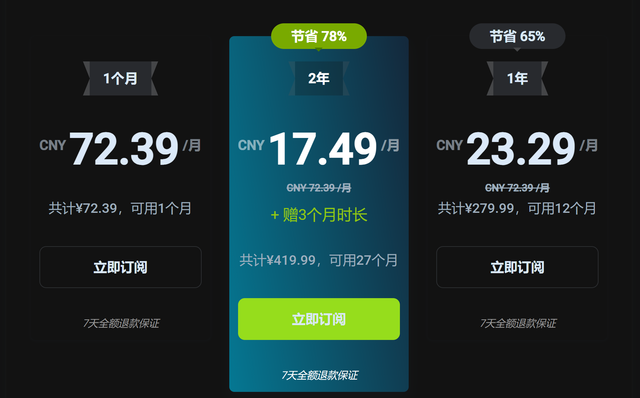

| VPN | Obfuscation | From / month | Plan | Free plan | Refund | Alipay | UnionPay | Crypto | Website opens in China | Trustpilot | |
|---|---|---|---|---|---|---|---|---|---|---|---|
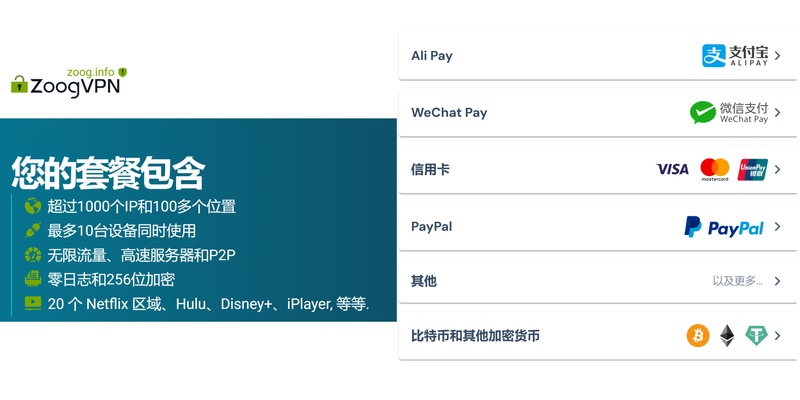
 ZoogVPN | Turn on manually Shadow | $2.49/mo | 27 months: $59.99 | Yes | 7 days | ✓ | ✓ | ✓ | ✓ | Official site blocked; our special link opens (4.4 s) | 4.2/5 (195 reviews) |
 NordVPN | Turn on manually Obfuscated Servers / NordWhisper | $3.49/mo | 27 months: $94.23 | No | 30 days | ? | ✗ | ✓ | ✓ | ✗ Blocked | 4.2/5 (51,628 reviews) |
 ExpressVPN | ✓ On by default all servers | $3.00/mo | 28 months: $84 | No | 30 days | ✗ | ✗ | ✓ | ✗ | ✗ Blocked | 4.4/5 (29,706 reviews) |
 Surfshark | ✓ On by default Camouflage, with OpenVPN | See site | See site | No | 30 days | ✗ | ✗ | ✗ | ✓ | ✗ Blocked | 4.3/5 (31,823 reviews) |
 Proton VPN | Turn on manually Stealth, free plan too | $2.99/mo | 12 months: $35.88 | Yes | 30 days | ✗ | ✗ | ✗ | ✓ | ✗ Blocked | 2.1/5 (1,040 reviews) |
 Astrill VPN | Turn on manually StealthVPN / OpenWeb | $12.50/mo | 24 months: $300 | No | See site | ✗ | ✗ | ✗ | ✓ | ✗ Blocked | 1.3/5 (110 reviews) |
 Private Internet Access | Turn on manually Shadowsocks, OpenVPN only | $2.03/mo | 40 months: $81.2 | No | 30 days | ✗ | ✗ | ✗ | ✗ | ✗ Blocked | 4.2/5 (11,033 reviews) |
 CyberGhost | Turn on manually selected servers | $2.19/mo | 28 months: $61.32 | No | 45 days | ✗ | ✗ | ✗ | ✓ | ✗ Blocked | 4.0/5 (24,178 reviews) |
 PureVPN | Turn on manually switch to OpenVPN | $1.69/mo | 60 months: $101.55 | No | 31 days | ? | ? | ✗ | ✓ | ✗ Blocked | 4.4/5 (17,994 reviews) |
 AdGuard VPN | ✓ On by default TrustTunnel | $2.99/mo | 24 months: $71.76 | Yes | 30 days | ✓ | ✗ | ✓ | ✓ | Official site blocked; our special link opens (3.7 s) | 4.3/5 (290 reviews) |
 Mullvad | Turn on manually QUIC / Shadowsocks / LWO | $5.61/mo | €5/mo | No | 14 days | ✗ | ✗ | ✗ | ✓ | ✗ Blocked | 3.2/5 (192 reviews) |
 Windscribe | Turn on manually Stealth / WStunnel | $5.75/mo | 12 months: $69 | Yes | See site | ✗ | ✗ | ✗ | ✓ | ✗ Blocked | 4.7/5 (13,355 reviews) |
 StrongVPN | Turn on manually Scramble, OpenVPN TCP | See site | See site | No | 30 days | ✓ | ✗ | ✗ | ✗ | ✗ Blocked | 4.4/5 (2,695 reviews) |
 LightXtreme 闪连 | Not listed | $7.08/mo | 12 months: $84.99 | Yes | 30 days | ✓ | ✓ | ✓ | ✓ | ✓ Yes (3.5 s) | No page |
Prices checked 2026-11-10 on each vendor's pricing page (cheapest long plan, USD). Check the vendor's checkout for the final price.
Obfuscation checked 2026-11-14 on each vendor's site and help center: "on by default" = nothing to set; "turn on manually" = switch protocol or mode in settings; "not listed" = the vendor describes no obfuscation.
Payment methods checked 2026-11-10 on each vendor's payment pages: all 14 take cards and PayPal; ✗ = not listed, ? = the vendor's own pages disagree.
China access: whether the official website opens from mainland China networks (tests the website only, not the VPN connection). Last checked 2026-11-18 01:02 Beijing time.
Trustpilot score and review count checked 2026-11-10.
Urban vpn for microsoft edge a comprehensive guide is all about making Edge a safer, faster, and more flexible browser for everyday browsing. If you’re new to VPNs, think of it as a shield for your online activity and a passport to content from around the world. Here’s what you’ll learn in this guide:
- Why Urban VPN is a good fit for Microsoft Edge and how to install it
- How to configure settings for privacy, speed, and reliability
- Real-world use cases: streaming, gaming, shopping, and work
- Troubleshooting tips and common pitfalls
- A quick checklist to keep your VPN usage secure and efficient
Useful resources unlinked text Urban VPN official site - urbanvpn.com Microsoft Edge support - support.microsoft.com IP leak testing resources - browserleaks.com, dnsleaktest.com VPN privacy considerations - in-depth guides on privacy and security Tuxler vpn chrome extension your guide to using it and what you need to know
What is Urban VPN and why Edge users should consider it Urban VPN is a lightweight VPN service aimed at delivering fast, reliable virtual private networking without a lot of fuss. For Edge users, the appeal is straightforward:
- Global server coverage to access geo-blocked content
- Decent speeds for day-to-day tasks like streaming, browsing, and video calls
- A straightforward extension-based setup that plays nicely with Edge
- A no-fuss privacy approach for casual users who want better protection on public Wi-Fi
That said, no VPN is a one-size-fits-all solution. If you’re a power user who needs ultra-low latency for competitive gaming or enterprise-grade security, you’ll want to compare Urban VPN against other options in the market. This guide will help you decide if Urban VPN fits your Edge workflow and how to get the most out of it.
Setting up Urban VPN on Microsoft Edge Step-by-step quick setup
- Open Microsoft Edge and go to the Edge Add-ons store.
- Search for “Urban VPN” and click the extension listing.
- Click “Get” to install the extension, then confirm any prompts.
- Pin the extension to the toolbar for easy access.
- Open the Urban VPN extension, sign in or create an account, and choose a server location.
- Toggle the VPN on and verify your IP changed by visiting a site like whatismyipaddress.com.
Pro tips for a smooth setup
- Use a reputable server location close to your actual location for better speeds unless you need a specific country for content.
- Enable “Auto-connect on startup” if you often browse securely on public networks.
- When testing new servers, run a quick speed test to compare performance across locations.
- If a site blocks VPNs, try a different server or switch to a different protocol within the extension if available.
What to know about Urban VPN on Edge: pros and cons Pros Why Some Websites Just Wont Work With Your VPN And How To Fix It
- Simple integration with Edge via a browser extension
- Quick access to geo-blocked content
- Decent speeds for everyday tasks on standard home networks
- User-friendly for VPN beginners
Cons
- May not offer the same level of protection as a full VPN app with advanced features
- Some streaming services actively block VPN IPs, so you might need to switch servers
- Free or lower-tier plans can have data limits or slower speeds during peak times
Speed and performance: what to expect
- Real-world speeds will vary by server distance, time of day, and your baseline internet plan.
- If you’re on a 100 Mbps plan and connect to a nearby server, you’ll likely see 60–85% of your baseline speed for standard browsing and 20–50% for high-quality video streaming.
- For gaming, latency ping is the key metric. A VPN can add extra milliseconds, so pick a nearby server and test different locations to optimize ping.
Privacy and security: what Urban VPN provides
- Data encryption: VPNs generally encrypt traffic between your device and the VPN server. Edge users should check which protocol Urban VPN uses OpenVPN, IKEv2, or WireGuard-like options if available in the extension.
- IP masking: Your real IP is hidden from websites, reducing tracking.
- IP leaks: Always run a quick DNS/IP leak test after connecting to verify that your real identity isn’t leaking.
- Logging policies: Review Urban VPN’s privacy policy to understand what data, if any, is collected and retained.
Edge-specific tips for privacy
- Disable WebRTC leaks in Edge or use a browser extension that blocks or mitigates WebRTC leaks. WebRTC can reveal your real IP even when a VPN is active.
- Use HTTPS whenever possible. A VPN protects your data in transit, but HTTPS provides data integrity and encryption to the website itself.
- Combine with Edge’s built-in privacy features tracking prevention, password manager, secure browsing for a layered approach.
Common use cases and practical guidance Download f5 big ip edge vpn client for windows 10 and 11: fast setup, tips, and alternatives
- Streaming and geo-restricted content
- If your favorite streaming service is available in your country but blocked elsewhere, connect to a server in a permitted region.
- Test multiple servers in the target region to find one that consistently unblocks content without buffering.
- Bypassing school or workplace restrictions
- Public Wi-Fi and school networks often restrict content. Urban VPN can help you access blocked sites, but be mindful of local policies and terms of service.
- Safe browsing on public networks
- On cafes and airports, a VPN adds a layer of privacy. Combine with a strong password manager and secure DNS to minimize risk.
- Shopping and price comparison
- Some e-commerce sites adjust prices based on location. A VPN can help you compare prices from different regions, but remember to clear cookies to avoid price adjustments based on history.
- Travel and remote work
- When traveling, you can connect to your home country server to access region-locked work resources or local content.
Security best practices for Edge users with Urban VPN
- Use a strong, unique password for your Urban VPN account.
- Enable two-factor authentication if offered.
- Regularly check the security settings in Edge and the VPN extension.
- Review server options frequently; some servers may be overloaded or flagged by websites.
- Avoid sending sensitive information over VPN networks on public devices.
Troubleshooting common issues
- VPN not connecting: Check your internet connection first, then try a different server. Ensure the extension is enabled and updated.
- Slow speed: Switch to a nearby server, reduce simultaneous devices on the VPN, or test during off-peak hours.
- Websites not loading: Clear browser cache, disable conflicting extensions, or try a different protocol if the option exists.
- IP leaks: Run DNS leak tests after connecting. If leaks occur, disable WebRTC in Edge or adjust the VPN settings.
- Apps not routing through VPN: Remember that only traffic from Edge is tunneled by the extension. For all device traffic, you’d need the desktop VPN app if available.
Edge features that help maximize your VPN experience
- Edge profiles: Create different user profiles for work, streaming, and school to manage privacy settings separately.
- Tracking prevention: Use Edge’s built-in tracking prevention to reduce ad tracking in combination with Urban VPN for more privacy.
- Sandbox mode for testing: Use a separate Edge profile to diagnose issues with VPN settings without affecting your main browser environment.
Comparison with other VPNs for Edge users
- Urban VPN vs. free VPNs: Free options often come with data limits, slower speeds, and questionable privacy. Urban VPN offers more reliable performance and privacy assurances for a reasonable price.
- Urban VPN vs. premium VPNs: Premium services may offer stronger security features, more robust leakage protection, and higher uptime. If your needs are basic, Urban VPN is a practical choice for Edge.
- Why you might choose Urban VPN: Simplicity, quick setup in Edge, reasonable coverage of servers, and a good balance of privacy and usability for everyday use.
Advanced tips for power users Globalprotect vpn not connecting on windows 11 heres how to fix it
- Split tunneling: If available, route only sensitive traffic through Urban VPN while leaving general browsing on your regular connection to optimize speed.
- Protocol experimentation: Test multiple protocols if offered to find the best balance of speed and security for your location.
- Server rotation strategy: Maintain a list of reliable servers for streaming, gaming, and secure browsing. Rotate servers to avoid congestion.
- Privacy-conscious browsing habits: Regularly clear cookies, use private browsing when testing VPN settings, and be mindful of browser fingerprinting.
Data, statistics, and real-world numbers
- Global VPN usage trends show steady growth as more people take their privacy seriously.
- Commonly reported VPN performance ranges: 40–80 Mbps on mid-range plans with nearby servers; distances and server load can significantly affect speeds.
- Streaming unblock success rates vary by service and location, but nearby servers around major cities tend to offer the best results.
- Public Wi-Fi risk numbers highlight that unsecured networks can expose users to MitM attacks; a VPN is a strong mitigator.
Checklist for getting the most out of Urban VPN on Edge
- Install and pin the Urban VPN extension in Edge
- Sign in and choose a nearby server
- Verify IP and DNS leaks with a quick test
- Enable auto-connect on startup for secure browsing
- Test streaming and video quality on at least 3 different servers
- Review privacy policy and adjust settings for logging
- Use Edge tracking prevention and HTTPS whenever possible
- Regularly update Edge and the VPN extension
- Maintain a strong, unique password for your VPN account and enable 2FA if available
Real-world setup scenarios Scenario A: You want to watch a show not available in your country
- Steps: Open Urban VPN extension, connect to a country where the show is available, refresh the streaming service, and enjoy watching. If the show buffers, switch to a different nearby server and test a different quality setting.
Scenario B: You’re on a public Wi-Fi and need secure browsing
- Steps: Connect to Urban VPN on Edge before logging into any site. Confirm the VPN shows as connected, then browse using HTTPS to minimize risk.
Scenario C: You’re shopping for travel and want to compare prices Nordvpn background process not running on startup heres how to fix it fast
- Steps: Use Urban VPN to switch between regions, compare prices for the same product, and clear cookies to avoid personalized pricing bias. Remember to log out and recheck final checkout with your normal location.
User experience: what people say
- Many users appreciate the quick setup and ease of use with Edge.
- Some users report occasional server instability, which is common with many consumer VPNs.
- The key to a satisfying experience is server testing and staying mindful of bandwidth limits on free plans.
Ethical and legal considerations
- VPN legality varies by country. Always know local laws and employer policies when using a VPN.
- Avoid illegal activities; a VPN does not grant immunity from legal accountability.
Target audience and use-cases recap
- Casual browsers who want more privacy and access to geo-blocked content
- Students and travelers who need a simple, reliable VPN on Edge
- Light streamers who want decent performance without heavy configuration
- Everyday shoppers who want better price comparison across regions
Frequently asked questions
How do I install Urban VPN on Microsoft Edge?
Open Edge, go to the Edge Add-ons store, search for Urban VPN, click Install, pin the extension, then sign in and choose a server. Watchguard vpn wont connect heres how to fix it
Does Urban VPN slow down my connection?
Yes, VPNs typically add some latency. Nearer servers usually offer better speeds. Test a few locations to find the best balance.
Can Urban VPN unblock streaming services?
Often, yes. It depends on the service and server. If one server is blocked, try another nearby server.
Is Urban VPN safe to use on public Wi-Fi?
Yes, using a VPN on public Wi‑Fi increases privacy and security by encrypting traffic.
Does Urban VPN keep logs?
Check the latest privacy policy. Most consumer VPNs claim minimal logging, but specifics vary.
Should I enable WebRTC protection in Edge when using a VPN?
Yes. WebRTC can leak your real IP in some configurations. Disable or mitigate WebRTC leaks where possible. Where is my ip location with nordvpn your complete guide to finding, masking, and verifying your IP
Can I use Urban VPN for gaming?
You may experience some added latency. Test nearby servers to minimize lag.
How do I test for DNS leaks?
Use online DNS leak test tools like dnsleaktest.com after connecting to Urban VPN.
What happens if a server becomes slow or unstable?
Switch servers or protocols if available. Restart the extension or the browser.
Is there a free version of Urban VPN?
Free versions often have data limits and slower speeds. A paid plan typically offers better performance and reliability.
Final note Urban VPN for Microsoft Edge a comprehensive guide shows you how to make Edge a privacy-friendly, content-accessible browser without overcomplicating things. Start with a nearby server, test a few locations, and pair your VPN use with Edge’s privacy features for the best experience. If you’re ready to give Urban VPN a try, consider clicking through the linked partner offer to explore plans and options, and see how it fits your Edge browsing needs. How to download and install f5 vpn big ip edge client for secure remote access and other VPN tips