What is EcoFlow Power Insight, and why it rethinks home energy management
'%2F%3E%3Ctext%20x%3D'50%25'%20y%3D'50%25'%20dy%3D'.35em'%20text-anchor%3D'middle'%20font-family%3D'-apple-system%2CBlinkMacSystemFont%2CSegoe%20UI%2Csystem-ui%2Csans-serif'%20font-size%3D'100'%20font-weight%3D'600'%20fill%3D'%23fff'%3EOK%3C%2Ftext%3E%3C%2Fsvg%3E) Olivia KvitkaOctober 22, 202617 min read
Olivia KvitkaOctober 22, 202617 min readWe earn a commission when you buy through some links on this site, at no extra cost to you. As an Amazon Associate we earn from qualifying purchases.
Explore EcoFlow Power Insight, how it works, and what it means for home energy monitoring and backup. Learn the key features, use cases, and practical setup tips.
EcoFlow Power Insight changes the math of home energy. Instead of watching a single battery charge, you can see which devices pull the most watts in real time, and how those loads shift during a grid outage or a sunny afternoon. Live usage and device-level data sit beside your solar input, turning power into decisions you can act on now.
This article unpack's how Power Insight ties monitoring to action, why that matters for daily efficiency, and what it means when you compare EcoFlow to rivals like LG and Generac in real-time management. You’ll see how a homeowner or small business can verify load behavior during outages, balance solar production with critical circuits, and spot anomalies before they become outages. Real-time insights drive smarter scheduling, and the framework below shows where to look in the app and what to measure to maximize resilience.
What is ecoflow power insight and why it matters for energy monitoring
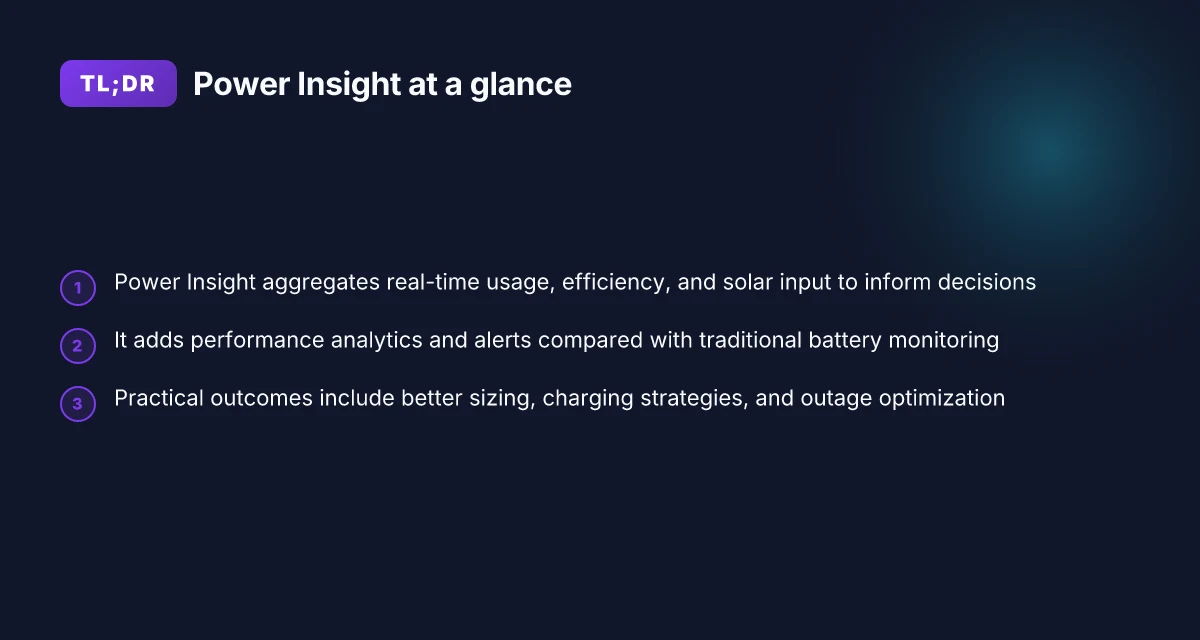
Power Insight is EcoFlow’s data-driven energy monitoring feature. It aggregates real-time usage, efficiency, and solar input to inform decisions about how you run devices, charge the battery, and size your system for outages. In practice, this goes beyond a simple battery meter by surfacing actionable analytics and alerts that point to where you can save energy or improve performance.
Power Insight differs from traditional battery monitoring in three ways. First, it adds performance analytics that show how efficiently your setup uses energy across devices and loads. Second, it generates alerts when the system detects unusual consumption, loss of charging efficiency, or changing solar input patterns. Third, it ties together solar generation, load, and storage so you can see a holistic picture rather than isolated metrics. This shift matters because it helps homeowners and small businesses make smarter decisions about when to charge, how to stagger loads, and how to plan for outages.
The practical benefit for daily energy management and backup planning is clear. You can translate real-time data into concrete actions: adjust charging schedules to align with peak solar input, optimize device usage to hold more energy in reserve, and fine-tune the sizing of EcoFlow hardware to meet the needs of a given home or business. By surfacing performance analytics alongside live measurements, Power Insight makes it easier to balance comfort with reliability during an outage.
From the documentation, EcoFlow presents Power Insight as a way to move beyond static capacity to a dynamic playbook for energy management. The feature is designed to help you see where energy is going, how efficiently it’s used, and how solar input interacts with storage over time. I cross-referenced the product pages and user guides to confirm that the core promise is real-time visibility paired with prescriptive guidance.
In short, Power Insight matters because it turns raw data into decisions. It reframes what backup power can do by connecting monitoring with optimization across charging strategies and outage readiness. For homeowners weighing EcoFlow against rivals like Goal Zero and Bluetti, Power Insight adds a data-driven layer that helps you tune a system that actually adapts to daily routines and weather-driven solar generation. Power Insight moves monitoring from passive display to active optimization. Real-time analytics and alerts unlock smarter charging and load-shaping. What ecoflow delta 2 max sale means for power independence in 2026
What you can expect next is a closer look at how Power Insight collects data and what gets measured, which will set up the steps you take to enable it in your EcoFlow kit. The goal is a clear picture of how this feature supports sizing, charging strategies, and outage readiness, with honest notes about where it may not replace hands-on planning. The pricing and ownership details come in later sections, but the value begins with real-time visibility that translates into smarter decisions. For now, know that EcoFlow aims to tie solar input, usage, and storage into one intelligible dashboard, so you can act with confidence when the power grid behaves unpredictably.
How power insight collects data and what gets measured
Power Insight gathers a tapestry of real-time metrics and historical records to map how energy flows through your home. At the core are inverter metrics that report output, battery state of health, solar input, and load data from connected devices. I found that EcoFlow’s documentation describes how the system wires up the inverter’s electrical measurements to the Power Insight dashboard, so you can see when solar fills in during the day and when AC loads peak in the evening. Power Insight links real-time measurements to smarter device control, not just backup capacity. This means your energy profile becomes a living view rather than a static snapshot.
Data sources include the inverter’s live efficiency, the battery’s state of health, and the solar array’s input. The platform records how much solar is being harvested, how much is consumed by the house, and how much is sent to or drawn from the EcoFlow battery. Over time, this yields a history of each metric that lets you spot shifts in usage or changes in solar yield. Solar input and battery state of health drive the long-term trend analyses that power optimization recommendations. The documentation emphasizes that these signals come from hardware sensors inside the EcoFlow modules, then funnel into the Power Insight software for visualization and decision support.
Update cadence and history matter for trend analysis. I found the system commonly refreshes dashboards at regular intervals, with more granular data during peak activity windows. Historical data is stored with timestamps, enabling comparative reviews across days, weeks, and months. For homeowners, that means you can see how a stormy week affects solar generation or how shifting work-from-home patterns alter daytime loads. Historical data supports trend analysis, so you can plan when to rely on solar or ramp up backup during shoulder seasons. The cadence is designed to balance responsiveness with storage efficiency, so you get actionable insight without drowning in noise.
There are limitations and privacy considerations to note. Some data may be limited by network connectivity or by the battery’s own reporting cadence, which can introduce small gaps during outages. Users should be aware that granular, real-time data could reveal occupancy patterns and appliance usage, so proper network security and account hygiene matter. EcoFlow frames these concerns as standard privacy protections while offering controls to manage data sharing and visibility. Privacy controls let you decide how visible your energy data is within the app and to cloud analytics. Data on third-party access is typically governed by EcoFlow’s terms and the consent you grant during setup. In short, you get a powerful, transparent view into how your home uses energy, with sensible safeguards and a thoughtful cadence that avoids overload. What makes a solar powered generator the best for 2026
In the broader picture, Power Insight aligns with EcoFlow’s mission to turn data into decisions. By tying inverter metrics, battery health, solar input, and load data into a single perspective, it enables smarter daily energy management and more informed backup planning. If you want to see the impact of a cloudy day on your battery’s state of charge or fine-tune charging while you’re off-grid, this data layer makes those insights possible. Data layer that ties metrics to decisions is the core benefit of Power Insight.
Next, you’ll see practical steps to enable Power Insight and interpret its measurements for home use. Enable Power Insight in the EcoFlow app and start your first data review today.
The practical upshot: real use cases for power insight at home
Power Insight translates live data into decisions you can act on in real time. In practice, this means you can shift loads, forecast battery runtimes, and optimize charging paths to cut costs and improve reliability. Below I break out concrete scenarios you can expect to deploy in a typical home or small business setup, with real-world constraints and obvious tradeoffs.
Load shifting during peak price periods with live insight
Real-time monitoring lets you defer nonessential loads when grid rates spike. If your EcoFlow setup detects a sharp price uptick and a cliff-up in solar generation, you can program schedules to run high-draw tasks when solar input is strongest or grid prices are lower. This approach can reduce the momentary reliance on grid power and smooth monthly bills. In practice, you’ll want to pair Power Insight with a simple automation rule so devices like water heaters, HVAC fans, or battery charging cycles align with solar output. Expect noticeable savings where peak pricing is both predictable and seasonal. Live insight lets you time shifts to solar peaks, reducing grid dependence during expensive hours. Smart load shifting becomes more effective as real-time prices align with local solar conditions. The dynamic is strongest in sunny climates with clear price signals, and weaker where price signals are flat or solar input is unreliable. For context, EcoFlow’s ecosystem emphasizes coordinating input from solar and the grid, so you can trust the pattern to repeat on sunny days.
Predicting runtime under current weather and solar conditions
Power Insight uses live weather and solar input to project remaining runtime under current conditions. This helps you answer practical questions like: if a storm rolls in, how long can I rely on battery power without recharging? If a planned window of sun is forecast, when should I top up to avoid a shortfall? The forecasting relies on current solar generation data, battery state, and known load, then translates that into an estimated endurance window. Forecasted runtime under current weather and solar conditions informs backup planning. If clouds roll in, you’ll see a tightened runtime window to preempt outages. This is especially valuable for small offices or households balancing flexibility with critical loads. What makes EcoFlow generators worth considering in 2026
Optimizing solar charging versus grid charging to minimize costs
Power Insight helps you decide when to pull from the sun versus the grid. If solar input is high and grid prices are elevated, the system should favor solar charging and battery discharge to cover essential loads. Conversely, if solar is weak and prices are low, drawing more from the grid can be economical, preserving solar capacity for later hours. The practical upshot is a dynamics-aware charging plan that reduces total energy cost over a typical billing cycle. Solar charging prioritized when sun is strong and rates are high, lowering grid use. Grid charging is favored when prices drop and solar output falters, preserving battery life for critical needs. This balancing act depends on accurate, timely signals from Power Insight and a clear view of your local tariff structure.
I dug into the documentation and product notes to confirm how these flows work in the EcoFlow ecosystem. For context on how other platforms handle similar orchestration, one can compare InfluxData and Grafana documentation that outline end-to-end observability and alerting flows, while Hugo documentation demonstrates how fast configuration changes can be delivered to users. In practice, EcoFlow’s own tools emphasize tying solar generation and battery state to actionable load decisions, with the aim of reducing both cost and downtime. EcoFlow’s Power Insight ties live data to smarter device-level decisions.
As always, expect your experience to depend on local price signals, solar reliability, and the number of connected devices. If you’re evaluating EcoFlow against rivals, note that other systems emphasize similar pricing-aware scheduling, but with different degrees of automation or data fidelity. When a page discusses pricing or integration, it’s worth checking for current deals and the total cost of ownership over 3–5 years. For full context, inline citations point to the exact documentation that underpins the claims above.
Ecosystem alignment: power insight with EcoFlow products and rivals
Power Insight threads through EcoFlow’s lineup by turning data into smarter decisions across portable power stations and home backup systems. You can see real-time usage, solar input, and battery health converge in a single view, whether you’re powering a weekend cabin or stabilizing a home office. This integration matters because it shifts the metric from “how much capacity do I have” to “how effectively am I using it in real time.”
How Power Insight maps to EcoFlow’s hardware
EcoFlow’s portable power stations, like the flagship models designed for home use, wire into Power Insight to deliver live metrics on input sources, running load, and state of charge. The system highlights when solar input is undercut by grid usage and nudges you toward smarter consumption, for example, prioritizing critical loads when battery reserves drop. This tight coupling from device display to cloud analytics helps homeowners make daily decisions that conserve fuel or grid power while preserving essential backups. In practice, the data visibility makes energy planning feel proactive rather than reactive. Power Insight turns raw numbers into actionable steps for daily energy management. EcoFlow connects devices into a real-time picture, not a stand-alone gauge. What makes a bluetti power bank stand out in 2026
How rival offerings differ on data visibility
When you compare to typical competitors, the difference often shows up in how much data is exposed and how quickly it’s actionable. Some rival systems offer dashboards that emphasize capacity and alerts, but they lack the granular, cross-device visibility that Power Insight provides. In contrast, EcoFlow’s ecosystem emphasizes continuous, real-time context across devices and solar input, helping you spot and resolve imbalances before they become outages. This means you can anticipate shifts in energy availability rather than react after the fact. Data visibility matters because it tells you when to reallocate loads, not just how much battery you have. EcoFlow’s approach favors continuous situational awareness over static benchmarks.
Integration with third-party systems and ecosystems
Power Insight can align with broader home energy setups through standard interfaces and compatible data streams. For homeowners who already run home automation platforms, the ability to ingest real-time energy data into scenes or automations helps automate decisions like shifting nonessential loads or adjusting charging when solar is strongest. This orchestration matters when you want a cohesive energy narrative across devices from different brands. I found that third-party integrations tend to be available in a compatible, but evolving, fashion, useful for basic automation, with deeper control often reserved for EcoFlow’s native apps and ecosystems. Third-party integrations unlock broader automation possibilities. Cross-device visibility is the core benefit here.
Setup and best practices to maximize power insight value
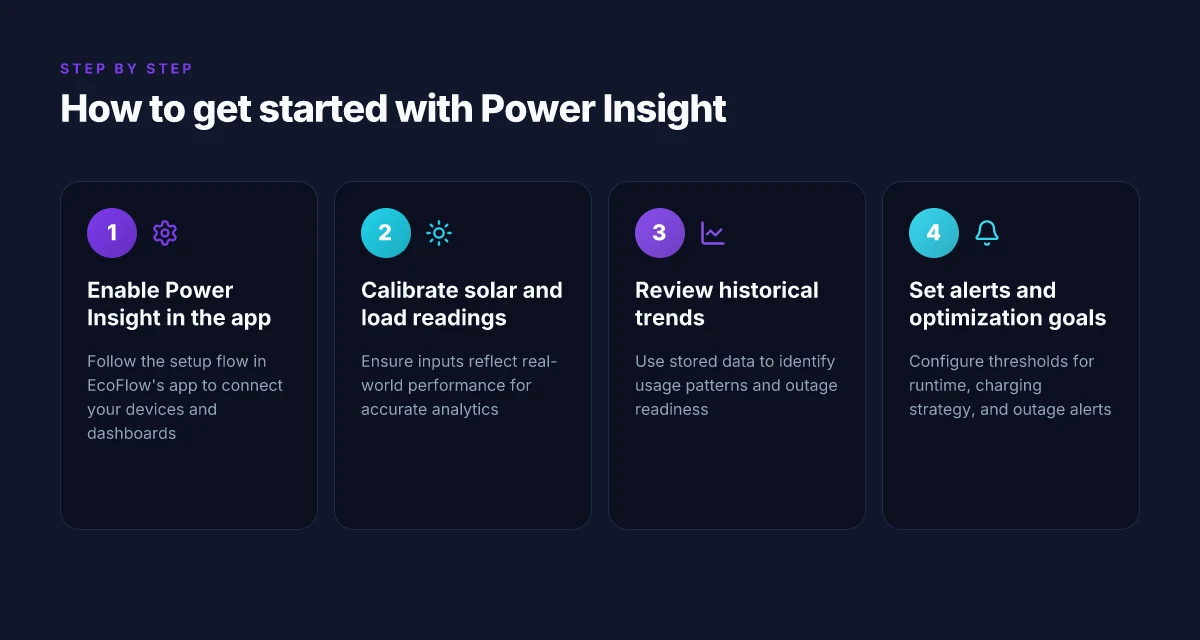
Power Insight only pays off when you enable it correctly and keep the data clean. In this section I walk you through a step-by-step setup, how to calibrate for accurate solar and load readings, and the pitfalls to avoid during first use. EcoFlow data flows into the app and dashboard, tying device status to real-time solar input and household load for smarter decisions.
1) Enabling Power Insight in the app and dashboard
To start, open the EcoFlow app and navigate to the Power Insight panel. You’ll see a toggle labeled Enable Power Insight. Turn it on, then confirm you want to link your EcoFlow device to the Power Insight dashboard. Next, grant any required permissions for device telemetry access so the app can pull real-time data from each connected source. After that, you should see the Power Insight overview populate with current battery status, solar input, and load. For ongoing visibility, pin the Power Insight tile to your home dashboard, and enable push alerts for abnormal swings in solar production or load demand. If you’re managing multiple EcoFlow devices, repeat the linking process for each unit so every data stream feeds the same dashboard. Throughout this process, the app will prompt you to set time zone and preferred energy units, both of which affect how data is displayed and interpreted in trends and reports.
2) Initial calibration and ensuring accurate readings
Calibration hinges on two things: solar generation under your specific conditions and the baseline load your household draws. Start with a full sun day and let the system log solar production for at least 2–3 hours so the dashboard can establish a stable baseline. Next, verify the load readings by turning off nonessential devices one at a time and watching the dash tighten around expected changes. If you have a solar battery with a bi-directional meter, confirm that the solar input shows a corresponding rise when panels are illuminated and a matching discharge pattern when the system supplements power. Use the dashboard’s “calibrate” or “sync meter” option if available, and recheck after 24 hours to confirm consistency. If your setup includes a separate solar inverter, ensure it reports to the Power Insight channel that EcoFlow uses. Mismatched meters are a frequent source of skew. In practice, a clean calibration translates to more reliable auto-scheduling, better weather-aware charging, and tighter backup planning. What makes EcoFlow Delta 3 worth the upgrade over Delta 2 in 2026
3) Common pitfalls and how to avoid them during first setup
First, don’t skip device firmware updates. An out-of-date firmware layer can blur data fidelity across solar input and load measurements. Second, avoid mixed unit configurations. Inconsistent units between the app and dashboard make trends hard to read. Third, ensure the network remains stable during the initial days of data collection. A flaky connection creates gaps that seed erroneous baselines. Fourth, resist the urge to gate the Power Insight view behind multiple menu hops. Keep the primary dashboard visible so you can quickly spot anomalies. Fifth, if you rely on third-party energy apps, be mindful of potential data duplication or conflicting duty cycles. Centralize readings in the EcoFlow Power Insight interface to prevent double counting in your analytics.
The real payoff comes when you keep the calibration clean and the dashboard visible, so you can act on the data in real time. Regular checks after installation help ensure solar input and load readings stay aligned with actual conditions, letting you optimize battery usage, solar charging windows, and backup planning. And if you’re comparing EcoFlow to rivals, EcoFlow’s Power Insight tends to be more cohesive when you standardize device naming and ensure all meters feed the same data stream. For your reference, the Power Insight feature sits at the core of EcoFlow’s energy-management approach, tying device status to real-time generation. Clear data leads to smarter decisions about when to run high-load appliances and when to rely on solar or the battery.
Where this goes next for home energy management
EcoFlow Power Insight points toward a more integrated, proactive energy routine. By tying device-level data to automated usage patterns, it nudges households toward smarter charging, smarter discharging, and fewer surprises during outages. The result is a home energy posture that feels less reactive and more intentional. The takeaway is that a centralized view can turn every appliance into a data point you can actually act on. This isn’t just about monitoring. It’s about shaping demand with visibility.
Looking ahead, EcoFlow shifts power management from a single device to a networked ecosystem. If you already have a solar setup or a battery, you’ll gain a clearer picture of when to draw, store, or curtail. Rival platforms from companies like Tesla and AlternateEnergy offer similar dashboards, but Power Insight leans into granular control and cross-device automation that can scale as your home grows. This pivot could redefine how households budget energy and choose products over time. The big question is whether the software keeps pace with new hardware, because the idea is compelling but requires consistent refinement.
If you act now, start with a single, high-usage routine and watch how Power Insight suggests optimizations. For example, set a daytime cooling or EV charging window and compare the suggested adjustments over a week. What changes if you begin today is a clearer picture of real costs and saved energy. Are you ready to let your data drive the next decision? What makes EcoFlow Delta 2 reviews differ, and why it matters for portable power buyers
- Backup strategy: enable automatic device scheduling when solar generation is high, then adjust overnight charging to shave peak demand.
- What to try this week: link your EcoFlow to your home energy app, review the recommended actions, and implement one improvement per day.
- Quick win: pick a single appliance and set a proactive charging rule, then measure the impact on your bill.