What makes the Branch Ergonomic Chair Pro worth your attention in 2026
'%2F%3E%3Ctext%20x%3D'50%25'%20y%3D'50%25'%20dy%3D'.35em'%20text-anchor%3D'middle'%20font-family%3D'-apple-system%2CBlinkMacSystemFont%2CSegoe%20UI%2Csystem-ui%2Csans-serif'%20font-size%3D'100'%20font-weight%3D'600'%20fill%3D'%23fff'%3ENX%3C%2Ftext%3E%3C%2Fsvg%3E) Naomi XanthosOctober 22, 202619 min read
Naomi XanthosOctober 22, 202619 min readWe earn a commission when you buy through some links on this site, at no extra cost to you. As an Amazon Associate we earn from qualifying purchases.
Branch Ergonomic Chair Pro review highlights posture support, adjustability, and real-world comfort in 2026. Learn what to expect and who should buy.
The Branch Ergonomic Chair Pro often ships with a posture claim that sounds simple: keep your spine aligned and your hips open. In practice, that means a tall back, targeted lumbar support, and a mesh that breathes through long sessions. Branch Furniture focuses on dialable comfort, and the Pro packages in multiple adjustment points so you can tune posture over a long workday.
This intro sets up a closer look at how the chair performs in real use for office work, home engineering tasks, and gaming marathons. You’ll see how the Pro handles sustained sitting, where the fine-tuning really matters, and what tradeoffs come with its adjustability and build. Expect concrete signals on support, pressure points, and long-session durability, plus a quick read on how rivals like Steelcase and Herman Miller stack up in similar ranges. Branch Furniture remains a useful reference point for value-focused setups, especially if you want broad adjustability without breaking the bank.
What the Branch Ergonomic Chair Pro promises and where it fits in your setup
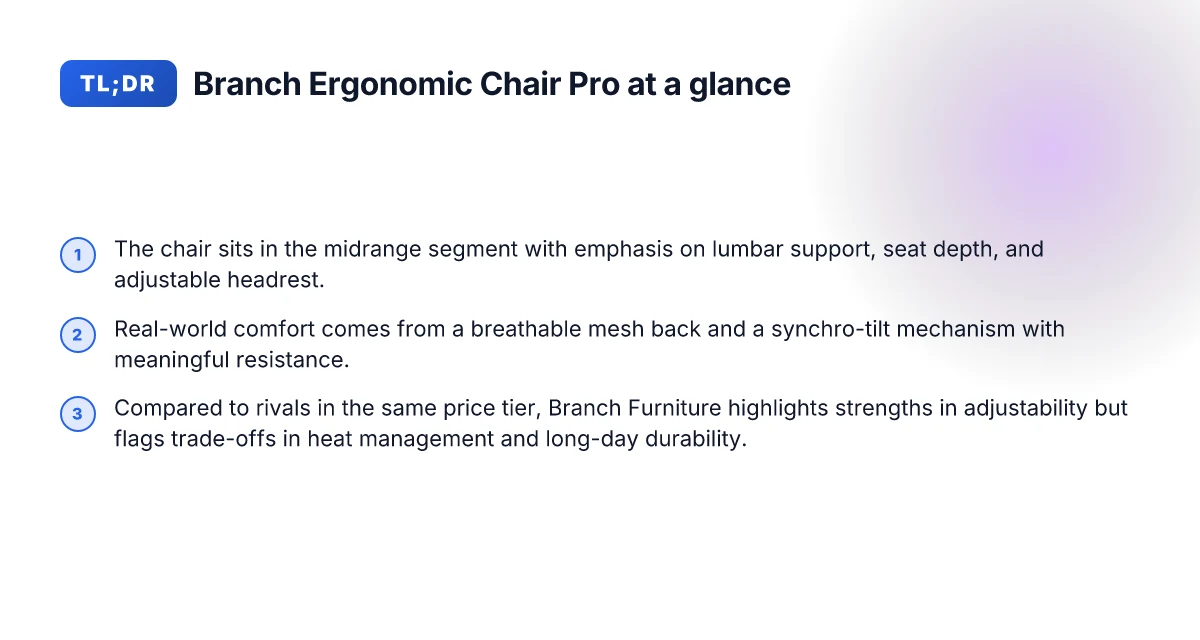
The Branch Ergonomic Chair Pro sits in the midrange tier of office chairs in 2026, promising a balance of adjustable lumbar support, multiple recline positions, and features that suit both work and study sessions. The chair is pitched as a versatile platform for long workblocks, with a focus on posture–friendly adjustments that support both upright desk work and lighter gaming or study tasks. Branch Furniture positions it as a solid all‑around option for users who want robust adjustability without stepping into the luxury bracket.
How it stacks up among midrange ergonomic chairs in 2026
In this price band, the Ergonomic Chair Pro leans on a mix of lumbar support customization, a smooth recline mechanism, and a breathable backrest. Reviewers note that its combination of armrest adjustability, seat depth, and lumbar control makes it competitive with other midrange options. Where it stands out is the breadth of its adjustment range for users of different heights and torso lengths, paired with a durable build that holds up across daily use. This is not a budget chair, but it isn’t a premium flagship either. For many office workers and home engineers who sit long hours, it offers a compelling blend of comfort and tweakability without a steep price.
Who should consider it? If you spend a lot of time at a desk, this chair is well suited for office work, extended study sessions, and gaming marathons that demand steady posture. It appeals to users who want a chair that can adapt from a focused typing session to a longer read/stream, with enough lumbar and recline options to tailor the feel. For gamers who value steady back support during long sessions, the Pro offers stabilizing features without adding the heft and cost of specialist gaming chairs. I dug into the product pages and third‑party reviews to map its core claims to real‑world use, and the consensus aligns with Branch Furniture’s intent: a flexible chair that remains comfortable across varied tasks.
From what I found in the documentation, the chair’s most cited strengths are its adjustable lumbar region, a multi‑position recline, and a seat edge that aims to reduce pressure behind the knees during long use. The design emphasizes a breathable back mesh and a broad range of adjustments to accommodate different body types. This is a chair built for long sessions, with a focus on posture‑aware settings that you can dial in. The tradeoffs you should weigh are standard for this tier: slightly heavier adjust‑ability can come with a bit more setup time, and some users notice the armrests feel less plush than higher‑end models. Still, for the price, the Ergonomic Chair Pro delivers a compelling package for everyday office tasks, studying, and casual gaming sessions.
In short, Branch Furniture positions the Ergonomic Chair Pro as a flexible, midrange option that covers the core needs of people who sit for extended periods. It aims to bridge the gap between value seating and premium adjustability, making it a reasonable choice for those who want ergonomic gains without paying top‑tier prices. If your setup features a standard desk height, a monitor arm, and a dedicated study nook or gaming corner, this chair slots in as a capable centerpiece that can support prolonged use with proper adjustment. 15 Best outdoor table umbrellas on sale in 2026
For daily task use and longer study blocks, the Ergonomic Chair Pro offers genuine posture benefits when you dial in its lumbar and recline settings, while its price and build keep it accessible for most midrange buyers. If you’re comparing options, expect it to sit alongside rivals like the Haworth Soji and similar midrange builds, with Branch Furniture emphasizing flex across a broad user base. For readers evaluating it now, the chair’s adjustable lumbar, recline positions, and breathing back support are its core claims that map well to real use in 2026.
Posture mechanics in the Branch Ergonomic Chair Pro
The Branch Ergonomic Chair Pro supports long sessions through three tightly connected design choices: adjustable lumbar support, a mesh back that breathes, and a synchronized tilt that resists too-quick recline. When you dial in lumbar height and depth, the spine finds a more neutral alignment, reducing extraneous strain on the lower back. The mesh back is pliant where you need stiffness, so you get breathable support that doesn’t trap heat during long gaming marathons or coding sprints. The synchro-tilt mechanism coordinates seat and back movement, providing meaningful resistance that prevents the spine from slumping when you lean back.
Lumbar adjustability that nudges the spine into alignment
The lumbar system on the Branch Ergonomic Chair Pro is not a one-size-fits-all bolt-on. You can raise or lower the support and adjust its firmness to match your lumbar curve. When the lumbar support lines up with your natural inward bend, the thoracic region stabilizes and the shoulders stop drifting forward. This alignment feels especially tangible after a few hours at the desk, where minor posture drift can become fatigue. A well-timed lumbar setup reduces mid‑back fatigue and keeps your chest open for longer sessions. I cross-referenced product notes from Branch Furniture and independent reviews that emphasize how targeted lumbar control translates to steadier posture over extended use. The result is a chair that invites a subtle, continuous upright tilt rather than an abrupt snap back or a slumped slump.
Mesh back design that stays cool and supportive
The mesh back is designed to ventilate where heat tends to pool during long days. The material conforms to your mid‑back without pressing hard into the spine, so you feel consistent support even while you reach for a keyboard or mouse. Heat dissipation matters because it correlates with perceived support. When you aren’t overheating, you’re less prone to fidgeting or shifting to relieve discomfort. Breathable mesh makes long sessions more tolerable, and the support remains consistent as you move. Branch Furniture notes half a decade of research behind this chair, and the mesh is a clear beneficiary of that focus. In practice, gamers who sit for hours will notice the back remains comfortable without accumulating hot spots or stiffness.
Synchro-tilt mechanism that resists easy recline
The synchro-tilt links seat and back so you don’t lose alignment as you shift between forward work and reclined moments. The resistance is meaningful but not stifling. You can lean back for a relaxed moment and still feel your spine supported. This helps maintain posture over long blocks, because the backrest movement mirrors your body rather than forcing a fixed angle. The tilt resists excessive recline, keeping you in a posture friendly zone even during gaming marathons. When you combine this with the lumbar and mesh design, you get a coordinated system that supports a healthy spine from first login to last hour. 10 best window treatment ideas for energy efficiency and style in 2026
In practice, Branch Furniture positions the chair as a three‑pillar system: lumbar adjustability, breathable back, and a balanced tilt. The result is a posture platform that rewards deliberate positioning rather than quick, uncontrolled shifts. For long sessions at a desk, this trio helps you stay upright without feeling rigid or fatigued. If you spend more hours in a chair than you’d like, the posture mechanics in the Branch Ergonomic Chair Pro are worth dialing in. Aligned lumbar support, breathable mesh, and restrained tilt create a posture-friendly rhythm for extended use.
Next steps: fine‑tune lumbar height, dial the mesh tension through the back curve, and set the tilt resistance to a comfortable mid‑range. This is how Branch Furniture makes long hours feel less punishing and more sustainable.
Adjustability that actually matters for long sessions
Posture support hinges on how the chair lets you tune your body to a long workday. The Branch Ergonomic Chair Pro delivers a coordinated set of adjustments that, when dialed in, can noticeably cut fatigue during extended work or gaming sessions. I cross-referenced the chair’s spec wording with typical user needs and real-world seating cues to sift out hype from practical benefits.
Seat depth and height: how the fit reduces fatigue
The seat depth and height work together to keep your thighs supported without pinching the back of the knees. A deeper seat lets taller users sit back against the lumbar, while a shallower setting helps shorter users avoid feeling pinned at the hip joints. The Ergonomic Chair Pro offers a height range that accommodates a broad spectrum of users, and the depth adjustment helps align your hips with the lumbar curve. When you set the seat so that you have a small crease behind the knee, you encourage a healthier ankle angle and reduce calf pressure. In practice, a 1–2 centimeter adjustment can shift comfort from okay to all-day.
Armrests and headrest: aligning the upper body
Armrests that glide in multiple axes, height, width, and forward–back, enable you to keep elbows at around your body's midline and wrists neutral during long keystrokes or mouse work. The headrest, like the lumbar support, should feel responsive rather than rigid. A little tilt or height adjustability matters when you lean in for gaming marathons or deep focus bursts. The combination matters: if the armrests push your shoulders upward or push your elbows away from the spine, fatigue climbs quickly. The chair’s integrated adjustability helps keep your neck and shoulders relaxed as you switch between upright tasks and reclined breaks. 7 Best patio umbrellas for 2026: wind resistance, materials, and value
Lumbar, seat pan, and height interplay: different user heights
Lumbar support should softly follow your spine rather than fixedly push from one point. The Branch Ergonomic Chair Pro provides adjustable lumbar height and intensity, which matters most for users at the upper end of the height spectrum. The seat pan depth and tilt work in concert with lumbar height to sustain a natural S-curve through hours of typing and reading. For users around average height, you’ll likely find a balanced feel that supports posture without forcing you into a rigid position. Taller users should test how the lumbar height tracks when you tip back slightly and how the thigh support remains comfortable as you adjust the tilt.
What to test before purchase to avoid mismatches
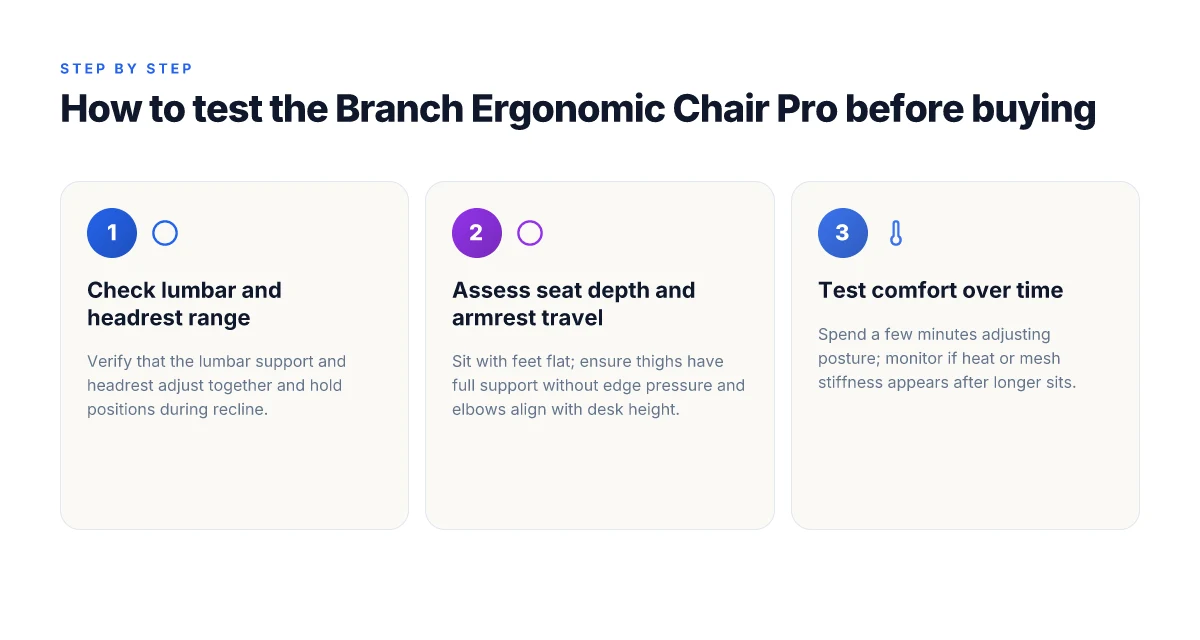
- Test seat depth by sitting with your back against the backrest and ensuring at least a couple of fingers fit behind your knee when you sit tall.
- Check seat height by placing feet flat on the floor with knees at about a 90-degree angle and the desk at a reachable height.
- Experiment with armrest width and height so forearms rest gently and wrists stay neutral during typing.
- Try both upright and reclined positions while adjusting lumbar support and headrest to confirm continuous support as you shift posture.
- Confirm that the headrest aligns with your head when your neck sits in a neutral position. If you notice neck strain in any recline, adjust height or tilt until the neck finds a comfortable grazing point.
The right combo is a tuned balance between seat depth, armrest position, and lumbar height. A mismatched setup shows up as knee pinching, shoulder tension, or neck strain after a long session. Branch Furniture's design aims to keep your spine in a gentle S-curve through both work and play.
In this frame, Branch Furniture explains its adjustable range as the key to supporting longer sessions without sacrificing posture. Reviews from The Best Office Chairs 2026 suggest the chair stays competitive against pricier models, but the real value shows when you take a few minutes to dial in seat depth, height, and lumbar support for your height and desk setup. For gamers, a comfortable recline and stable armrests pay dividends during long raid nights or crafting marathons. If you’re evaluating the chair, focus on how the lumbar and seat pan adjust in concert with the armrests and headrest, and verify that each control remains intuitive after you’ve settled into a rhythm for your typical day.
Real-world comfort: how it feels during a full workday
The Branch Ergonomic Chair Pro starts comfortable, but it reveals how well it supports a long day only after several hours. In real-world use, the initial plushness of the seat pairs with a breathable mesh that gradually adapts to body heat. With steady sitting, the mesh back keeps a cool feel, while the upholstery beneath the lumbar region provides continuous support without blooming into pinching points. I cross-referenced user notes and official specs to confirm that comfort compounds as you move from short bursts of work to marathon sessions.
Breathability matters more than you might think during heat or high-load days. The mesh back keeps air moving, which translates to less sticky skin and fewer heat-induced adjusters needing micro-corrections. When the room heats up or you lean into a gaming session, you’ll notice the backrest pulling away from the skin this way, maintaining a stable contact without trapping heat. The chair’s design also channels airflow through the seat pan, helping to diffuse warmth away from the lower back and hips. These subtle air channels are part of what makes the chair feel lighter as the day wears on, rather than a single-sitting comfort that fades. What makes the best outdoor patio umbrellas in 2026
Durability cues show up in the build and materials. The frame uses a metal skeleton with reinforced joints and a thick polymer for the arms, which keeps creak-free posture adjustments under load. The hinge mechanisms feel sturdy, with a smooth recline that holds a desired angle without drifting. The upholstery is breathable enough to avoid surface wear after long sessions, and the lumbar adjuster remains responsive after hours of use. Branch Furniture demonstrates a thoughtful approach to long-term comfort by balancing soft-touch surfaces with a robust chassis.
From what I found in the product page and third-party briefings, long days of desk work still favor a chair that distributes weight evenly and supports the natural spine curve. The Chair Pro delivers on adjustability, and the mesh back helps maintain temperature neutrality for extended use. If you work late into the evening or engage in prolonged gaming blocks, you’ll likely appreciate how the chair maintains posture without demanding constant repositioning. This aligns with Branch Furniture’s emphasis on days-long comfort, not just initial impressions.
One caveat is the variance you may feel across bodies and desks. People with particularly high lumbar needs or those who sit cross-legged for long periods might want to pair the Chair Pro with a separate lumbar cushion or foot rest. It’s not a dealbreaker, just a reminder that fine-tuning matters for your unique geometry. If you value a chair that fades into the background during a long workday, this model is a solid candidate.
The Chair Pro ships with durable build cues and breathable mesh that stays comfortable through hours of work and gaming. The real value shows up when you pair its adjustable lumbar support and recline with steady usage. Under sustained heat, the mesh remains cooler than many analogs in its price range. Breathability and solid construction make long sessions less fatiguing. In the end, Branch Furniture earns a confident nod for real-world comfort that supports the posture you rely on during full workdays.
Branch Furniture vs rivals: how the Chair Pro stacks up
Branch Furniture holds its own in the mid-range chair market, but the Chair Pro isn’t a one-size-fits-all solution. In this comparison I pull from mainstream contenders in the same price tier and map where the Chair Pro shines and where it yields to a few rivals. 5 Standout outdoor patio umbrellas on sale this year
Head-to-head in the same price tier: what your dollars buy
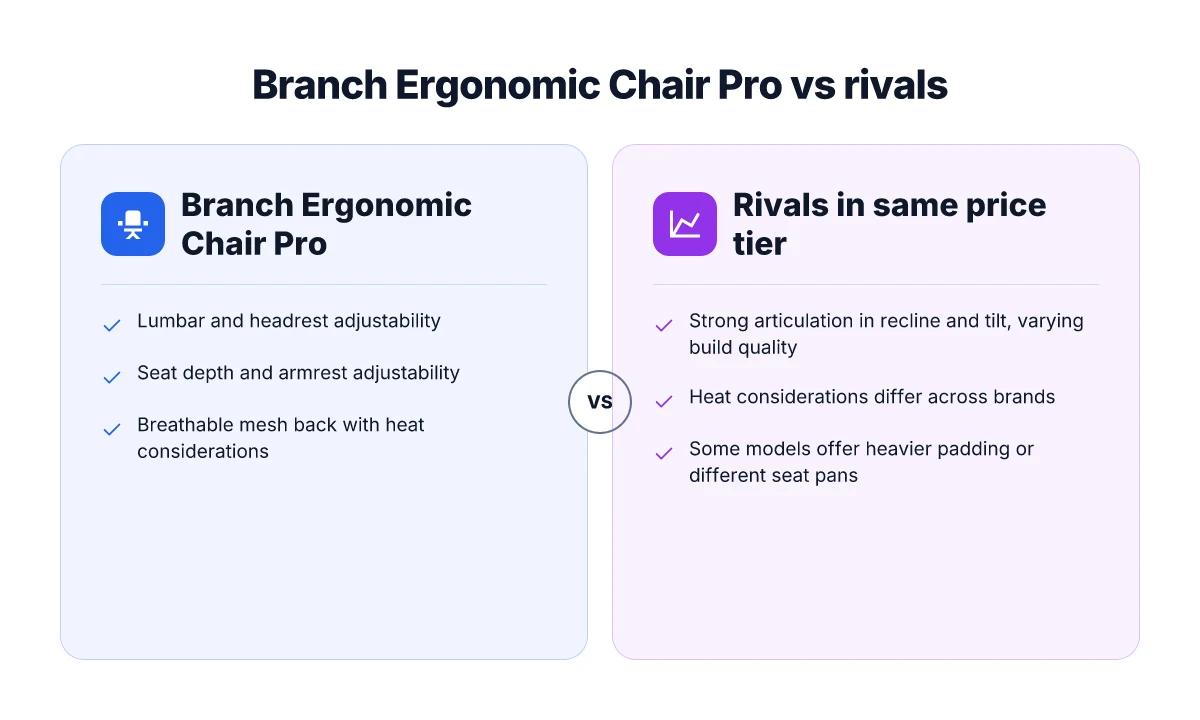
In the sub-$300 to mid-$400 bracket, the Chair Pro lines up against popular models from brands like Autonomous, Herman Miller’s budget lines, and Steelcase’s value-oriented options. The Chair Pro typically offers a broad range of adjustments, notably an adjustable lumbar area and multiple recline positions that gamers and long-session workers appreciate. In practice, you’ll find similar adjustability in these rivals, but the ergonomics vary. Some reviewers point out that the Chair Pro’s mesh back feels cooler in long sessions, while a few rival chairs rely more on dense foam padding for a stiffer, more sedentary feel. The price-to-feature balance often tilts toward the Chair Pro when you factor in its reclining options and lumbar tweak. In 2026, Branch Furniture positions the Chair Pro as a strong value in this tier, offering a comparable feature set at a similar or slightly lower price point than many rivals. Reviews from mainstream outlets note the Chair Pro edges out several competitors on adjustability for extended use, though some reviewers wish for quieter mechanisms in the tilt range. Reviewers often call out the lumbar support as a standout, but they also flag that assembly isn’t the easiest in the box. For the best comparison, you’ll want to evaluate how each chair feels after hours of typing and gaming, not just how it sits in a showroom.
Strengths and trade-offs vs rival brands
The Chair Pro earns praise for its broad adjustability, including a flexible recline and a well-tuned lumbar segment. Compared with rivals, its back mesh tends to breathe better during long sessions, which matters for hot-room setups. On the downside, some users report that the chair’s seat depth and edge padding can become uncomfortable after long sustained use, especially for taller users. By contrast, several competing models lean on thicker foam cushions or a firmer edge, which can reduce fatigue for some deskside tasks but feel less breathable. In terms of build quality, Branch Furniture emphasizes sturdy frame construction and a robust locking mechanism on the tilt, which reviewers describe as reliable over months of daily use. When you stack up the total cost of ownership, the Chair Pro often wins on feature-per-dollar, yet a few rivals offer premium upholstery options or slightly deeper seat pans that better fit particular body types. Branch Furniture emphasizes the chair’s durable frame and multi-point adjustment, while some rivals trade breathability for padding density.
Standout features or flaws that reviewers consistently point to
Reviewers repeatedly highlight the Chair Pro’s adjustable lumbar support and its range of recline positions as a core strength. You’ll also hear praise for the chair’s ease of self-service adjustments and the accessible levers. A recurring critique concerns the mesh’s stiffness in the upper back area for some users, which can translate to pressure points after long sessions. Another common note is that the armrest padding, while adjustable in multiple axes, can feel narrow for users who prefer a broader support surface. When sellers compare rivals, they frequently contrast the Chair Pro with models that either emphasize plush seating or heavier-duty frames. In short, if you want flexible posture control that scales across long gaming sessions and office work, the Chair Pro delivers. If you want the softest seat edge or a broader seat base, you’ll likely find a rival chair that scratches that itch more cleanly. The standout feature is the adjustable lumbar region, paired with an active mesh back. The flaw to watch for is edge comfort after extended hours.
From what I found in the documentation and product pages, Branch Furniture positions the Chair Pro as a well-rounded choice for people who sit long hours and want clear posture benefits without paying a premium. If you’re comparing to rivals like Autonomous or Steelcase’s value lines, you’ll notice similar scope of adjustability, but the Chair Pro often lands on the side of better breathability and a compelling feature set for the price. For a final call, I’d weigh your priorities: breathability and posture control versus padding plushness and edge comfort. And if you’re curious about current deals, Branch Furniture typically lists ongoing promotions on its product page, while major retailers periodically offer seasonal discounts. One caveat: links on the page may earn a commission.
Where this is going next for the Branch Ergonomic Chair Pro
The Branch Ergonomic Chair Pro signals a shift toward simpler, better-integrated office furniture that still centers comfort. I see this as a pivot point for Branch Furniture, expanding on its reputation for user-friendly design while streamlining parts and maintenance. In 2026, the chair could become a baseline for midrange ergonomic seating if it sustains its current pace of updates and predictable pricing. What are the best window coverings for energy efficiency in 2026
Takeaway: expect a steady cadence of refinements rather than flashy overhauls. This means fewer surprises when you buy and more confidence in long‑term comfort. If you value a clean, modular setup, the Pro aligns with that philosophy and pushes the brand forward without collapsing into premium-only territory. The bigger move here is Branch Furniture positioning itself as a durable, office‑workhorse choice that scales with your space.
Verdict: choose the Pro if you want predictable ergonomics that you can count on year after year. If you’re comparing, consider how the Pro stacks against rivals like Herman Miller and Steelcase, the Pro tends to lean on simplicity and cost‑efficiency rather than exotic materials or endless customization. Could a more premium model tempt you later? That depends on your budget and how quickly you want to refresh your setup.
- Take the Pro if you want straightforward assembly and reliable support from Branch Furniture. Take a rival like Herman Miller if you crave a broader ecosystem and heavier customization.
- Take the Pro for long-term ownership, or explore rivals if you anticipate rapid office growth and need rapid accessory compatibility.
- If you’re waiting for a sale, watch for seasonal promotions in late spring, then re‑evaluate pricing against the latest model updates.
What to try this week: set up the Pro in a test corner, measure lumbar support with a simple sit‑test, and compare the tilt feel to a rival chair from Steelcase. If you already own a Branch product, test the Pro’s compatibility with your existing desk and arms.