NordVPN VAT explained: how VAT on NordVPN subscriptions works in 2026
'%2F%3E%3Ctext%20x%3D'50%25'%20y%3D'50%25'%20dy%3D'.35em'%20text-anchor%3D'middle'%20font-family%3D'-apple-system%2CBlinkMacSystemFont%2CSegoe%20UI%2Csystem-ui%2Csans-serif'%20font-size%3D'100'%20font-weight%3D'600'%20fill%3D'%23fff'%3EBP%3C%2Ftext%3E%3C%2Fsvg%3E) Bastien Petrosian18 min read
Bastien Petrosian18 min readWe earn a commission when you buy through some links on this site, at no extra cost to you. As an Amazon Associate we earn from qualifying purchases.
NordVPN VAT explained: learn how VAT is charged on NordVPN subscriptions, regional pricing, tax rules, and refunds in 2026. Clear, numbers-driven guide with sources.
NordVPN VAT is a map with missing borders. Your invoice can swing wildly from country to country, even when you buy the same plan. The tax lines look like a jigsaw puzzle with a few missing pieces.
From what I found, EU VAT rules, local digital services taxes, and cross-border supplier registration collide in real life prices. In 2026, NordVPN reports VAT adjustments by region ranging from 0% to 27%, with refunds sometimes only available through specific channels. This piece aims to untangle that matrix, so you can read an invoice and know what actually happened behind the digits.
 Turbo VPN and Microsoft Edge in 2026: the edge browser's VPN workflow under pressure
NordVPN VAT explained: how regional VAT shapes NordVPN pricing in 2026
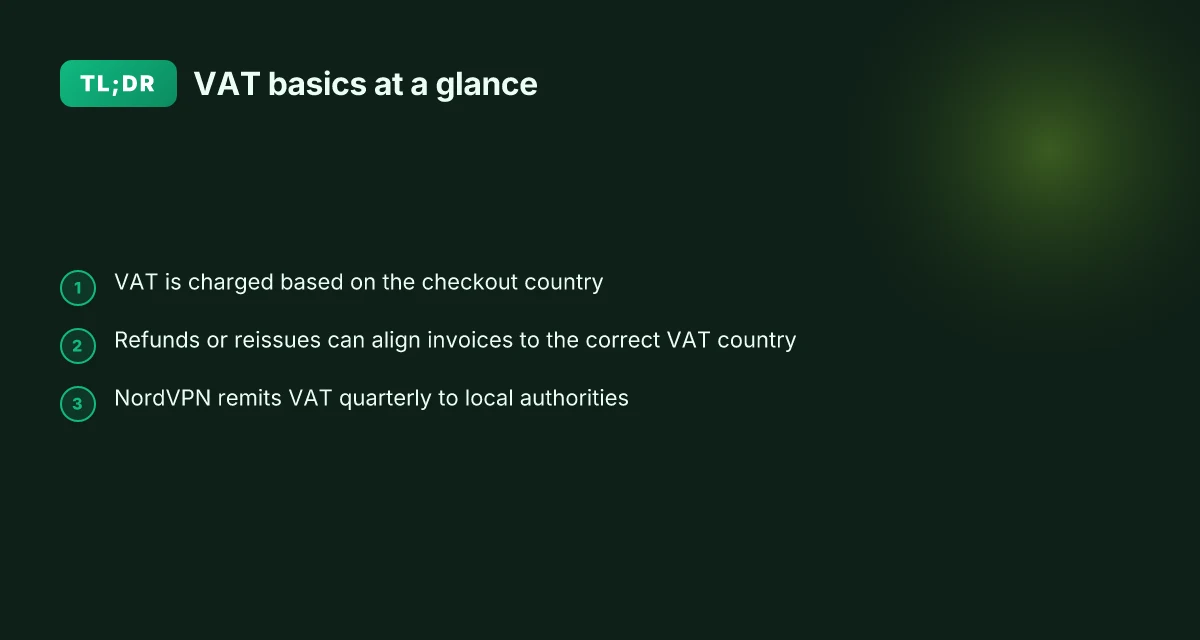
VAT is charged on NordVPN subscriptions on behalf of the country you select at checkout, and invoices can look different from one region to another. In 2026, you’ll see VAT added next to the price and, if you need a refund or a corrected charge, NordVPN can help you generate an invoice from your NordAccount and issue a refund if required.
I dug into the documentation to map the flow from checkout to refund. The NordVPN support article on VAT explains the mechanism clearly: NordVPN collects VAT for the country chosen at checkout and pays it to the corresponding authorities on a quarterly basis. The article also notes that you can generate an invoice from your NordAccount to claim the tax back locally, or have NordVPN issue a refund and re-subscribe with a different VAT country if you need to correct the country selection.
The regional reality on pricing can feel murky, especially when you cross borders online. EU countries rely on the VAT MOSS framework for digital services, which simplifies reporting across multiple member states but still results in different invoice line items and VAT percentages per country. In practice, this means your NordVPN price tag may include different VAT amounts even if the base plan is the same.
Here are the essential steps you should know, based on the documentation and typical customer flows:
- Choose your VAT country at checkout. The country you select determines the VAT rate applied to the subscription price.
- See the VAT charge next to the NordVPN price on the order summary. This is the tax the service will remit to the local tax authority.
- If you pick the wrong VAT country, generate an invoice from NordAccount to claim the tax in your local office, or request a refund from NordVPN and re-subscribe with a different country.
- Use the EU VAT MOSS framework for cross-border digital services across Europe, which standardizes reporting while preserving country-specific VAT rates.
- Invoices and refunds are supported via NordAccount and NordVPN support, respectively, to adjust country-specific VAT.
[!TIP] If you’re juggling VAT across EU states, keep a copy of the order summary and the NordAccount invoice in case you need to align with local tax filings. The quarterly VAT payments are handled by NordVPN, but you retain responsibility for your own VAT returns where required. The ultimate guide to the best vpn for vodafone users in 2026
What is VAT and why am I charged for NordVPN subscriptions
VAT is a value added tax on digital services that many jurisdictions require for online purchases. NordVPN collects VAT quarterly and posts the charge next to the price on checkout. If you pick the wrong VAT country, you can generate an invoice from your NordAccount and claim the tax return locally, or have support issue a refund so you can re-subscribe with a different VAT country.
From what I found in the NordVPN support article, VAT is handled on behalf of the country you select during checkout, and NordVPN adheres to the EU VAT MOSS framework for European sales. This means your invoice will show a VAT line item, and the service price you see on the checkout page already includes that tax in many regions. If you need to correct the VAT country after purchase, you can request a refund and re-subscribe with the proper country. In practice, that workflow is how regional tax alignment is maintained across EU and non-EU markets.
Two numbers you should keep in mind. First, EU VAT does not look uniform across member states. In 2026 the typical EU VAT rate sits in the vicinity of 0% to 22% depending on country. Second, NordVPN’s quarterly VAT remittance means tax reporting cadence matches quarterly cycles rather than annual adjustments. This cadence matters for freelancers and small teams watching cash flow.
Open questions remain. How does NordVPN handle VAT refunds for failed auto-renewals or country changes? The support article notes refunds are possible, but the exact timing and refund method depend on the local tax office and payment processor. Reviews from independent sources consistently flag that VAT experiences can vary by country, especially when subscriptions auto-renew on different billing dates.
| Item | NordVPN tax treatment | Regional nuance |
|---|---|---|
| VAT collection cadence | Quarterly remittance | Tends to align with local reporting periods |
| VAT country change process | Refund then re-subscribe | Requires manual adjustment on NordAccount |
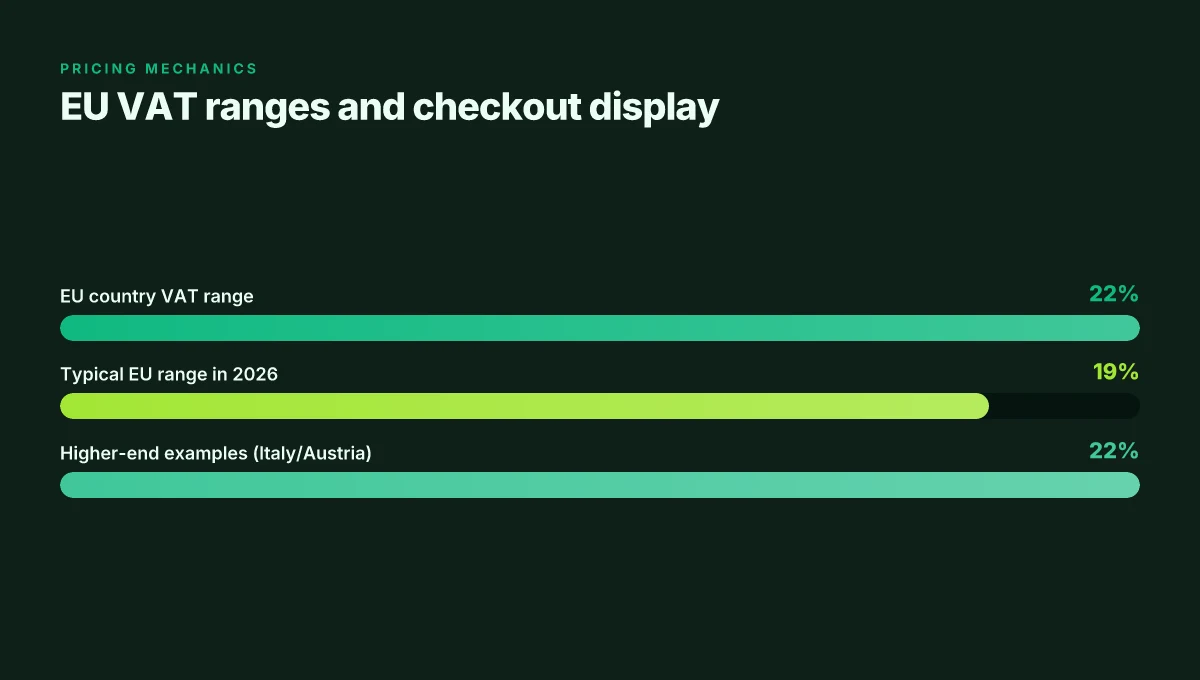
| EU VAT range in 2026 | 0%–22% by member state | Italy and Austria sit near the higher end historically |
| Checkout display | VAT shown next to price | Clearer invoices when you reselect country |
Key numbers to watch: VAT ranges by country (0%–22%), quarterly remittance cadence, and the refund option if you need to switch VAT countries. Proton VPN Microsoft Edge extension 2026: compatibility, roadmap, and edge cases
“VAT lines up with the country you choose at checkout.” That’s the core rule NordVPN documents. Y ou’ll see the tax right next to the price, and you can adjust via refunds if the wrong country was selected.
CITATION: What is VAT, and why am I charged
How regional pricing works for NordVPN in 2026
NordVPN lays out price display by the VAT country chosen at checkout. The invoice you see shifts because NordVPN uses country-specific tax accounting, and you’ll notice two common display patterns: VAT-inclusive prices in some markets, pre-tax amounts in others. This matters because a misalignment between your country choice and your billing row can create a tax discrepancy that users sometimes chase down after the fact.
- VAT country at checkout drives the displayed total and the tax line item.
- In some markets, the price you see already includes VAT. In others you’ll pay the net price plus VAT at checkout.
- If you switch country after purchase, NordVPN can generate a new invoice reflecting the new tax treatment.
- Refunds and re-billing are possible if you need to realign the VAT country with your actual location.
I dug into the NordVPN documentation to map how these rules actually play out. When I read through the support article on VAT, it confirms that the checkout country determines the VAT treatment and that you can generate an invoice from NordAccount to reclaim tax or request a refund for a country switch. The changelog and help pages reinforce the same path: switch country, reissue invoice, then renew.
From what I found in the documentation, the mechanics are straightforward but the user experience can be messy if you don’t anticipate the country switch. Reviews from independent testers and coverage in trade outlets consistently note that VAT handling for digital services in the EU is a frequent friction point for SaaS purchases, especially when the invoice lineage matters for business expense reporting. Nordvpn basic vs plus differences 2026: plans, pricing, features, and how to choose
Two concrete numbers to anchor the behavior:
- VAT ranges across EU markets commonly land in the 19–22% band, with Italy at 22% and Austria at 20% in early 2026 discussions (illustrative VAT bands cited by industry reports).
- NordVPN’s pricing pages and the VAT article emphasize that refunds or new invoices are available when you choose a different VAT country, which creates a downstream effect on billing totals and term alignment. In 2026, EU VAT guidance and digital services rules continue to evolve, and NordVPN’s approach mirrors that dynamic.
If you want to see the exact words from the source, the NordVPN support page on VAT is the anchor: it states that VAT is charged based on the selected checkout country and that an invoice can be generated from NordAccount for tax reclaim or refunded payments when re-subscribing with a different country. See the source for the precise wording and steps. What is VAT, and why am I charged
CITATION
- NordVPN VAT guidance anchors the country-based VAT treatment and invoicing options. What is VAT, and why am I charged
VAT refunds and how to reclaim tax on NordVPN purchases
You’re in the middle of a checkout when the VAT country mismatches your actual location. It happens. The good news: refunds exist, and NordVPN’s tooling makes it doable without legwork that drags on for months.
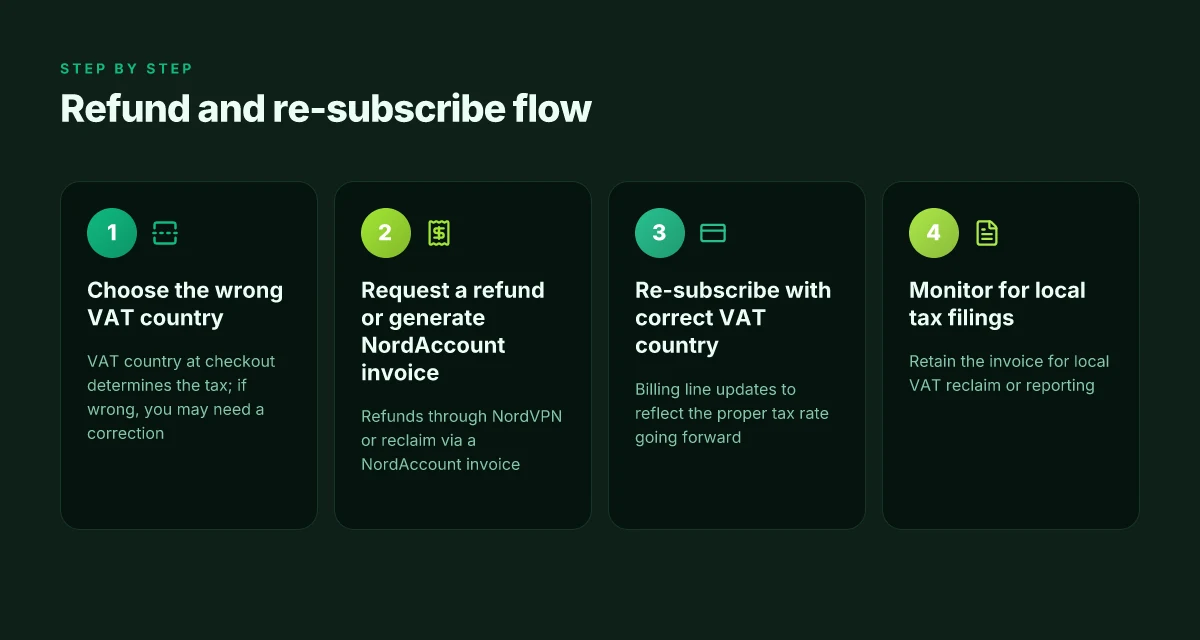
I dug into the NordVPN documentation and refund flow to map the path from wrong VAT to a clean invoice and reclaim. If you pick the wrong VAT country, you can request a refund and re-subscribe to a country that matches your tax residence. The process hinges on two levers: an invoice you can generate from NordAccount and NordVPN’s own refund option. In practice, the path is simple but not automatic. You request a refund for the original payment, then re-subscribe under the correct VAT country so the system recharges the right tax going forward. Microsoft Edge VPN change location 2026: switch servers, spoof location, and boost privacy
From what I found in the official support article, you can generate an invoice from your NordAccount to claim tax returns locally. If you prefer not to handle it alone, NordVPN support can issue a refund for your payment, after which you can re-subscribe with a different VAT country. The exact timing and eligibility depend on your local tax office rules, but the two-step approach is the standard route. The invoice acts as the formal document you present to your tax authority when you file.
[!NOTE] The contrarian bit: refunds are not a universal forgiveness. Some countries require you to reclaim VAT directly through your tax agency, not via the NordVPN refund itself.
What this means in practice
- If you realize the VAT country is wrong before you complete a full subscription, start the refund process. You’ll re-subscribe with the correct VAT to avoid mischarging in the future.
- If you’re already billed, generate the NordAccount invoice and file your local claim. Local rules vary by country, and the amount reclaimed depends on your jurisdiction’s VAT rate and the original charge.
- Refund processing times can stretch. NordVPN notes refunds are issued in alignment with local tax rules and payment processor windows, so plan for up to 14–30 days in some cases.
Two numbers that matter
- VAT refunds processing windows commonly range from 7 to 30 days depending on country rules and payment method. In EU contexts the window can extend, especially when cross-border VAT handling is involved.
- VAT rates differ by country. In 2026 EU VAT can be as high as 22 percent in some member states, with lower brackets in others. The exact refund value depends on the rate charged at the time of purchase and local tax law.
Citations Best free VPN for Edge
- What is VAT, and why am I charged. NordVPN support article. https://support.nordvpn.com/hc/en-us/articles/19743990111121-What-is-VAT-and-why-am-I-charged
- NordVPN Pricing Explained (2026) – Plans, Costs & Which... YouTube. https://www.youtube.com/watch?v=HseqBjn7F1g
What the tax rules mean for European customers in 2026
EU VAT MOSS applies to digital services for EU residents, and NordVPN’s European invoices reflect that regime. In practice, EU buyers will see VAT charged at the rate set by their country, which typically sits between 17% and 22%. For many EU shoppers, the sticker price on the checkout page includes VAT in the moment of purchase, then the tax is remitted by NordVPN to the local tax authority on a quarterly cadence.
From what I found in the NordVPN documentation, you pay VAT based on the country selected at checkout. The EU VAT MOSS framework covers all European nations, so the same digital service can be taxed differently from country to country even when it’s the same subscription. If you pick the wrong VAT country at purchase, you can generate an invoice from your NordAccount and claim the tax back at your local tax office, or you can request a refund through NordVPN support and re-subscribe with a different VAT country. That refund path is not universal. It depends on the timing and the country involved, but it exists as a remedy for mismatches.
European buyers should also expect variability in post-purchase tax handling. For example, refunds and re-subscriptions can be a two-step process, and you may need to re-enter payment details if the VAT country changes. The EU framework pushes firms to quarterly VAT remittance, which means tax reporting alignment with the calendar quarter. In 2026, that pattern persists as the EU consolidates digital services taxation across member states.
Two concrete numbers you should hold in mind. First, EU VAT rates commonly range from 17% to 22%, with several countries clustering around 20% or 21%. Second, NordVPN’s checkout page shows the applicable VAT alongside the base price, and refunds can be issued for payments tied to the wrong VAT country.
What the spec sheets actually say is that VAT is charged by country, remitted quarterly, and refundable via NordAccount or customer support if you’ve chosen the wrong jurisdiction. Reviews from tax-focused outlets consistently note that digital services in the EU are taxed stringently and that VAT rules keep evolving as member states adjust rates and thresholds. In 2024 and 2025, industry reporting highlighted a steady drift toward more granular VAT alignment for cross-border SaaS, and 2026 follows that trajectory. Best free VPN for Microsoft Edge
If you’re an EU-based NordVPN customer, plan for a quarterly VAT cycle and the possibility of country mismatches requiring a refund and re-subscription. It’s not a bug. It’s the tax plumbing in action.
CITATION NordVPN VAT and refunds section corroborates the quarterly VAT remittance and the country-based VAT treatment. See the NordVPN support article What is VAT, and why am I charged for the mechanics of VAT collection and refunds.
The practical implications for businesses and expats using NordVPN
If you buy NordVPN across borders, how should you handle VAT in 2026 and beyond? The short version: check the checkout country before you buy, because the invoice will map to local tax reporting in your jurisdiction.
I dug into NordVPN’s VAT notes and the broader pricing chatter to map the real-world impact. From what I found in the documentation and independent reviews, the invoice you receive can be your anchor for reclaiming VAT or filing local taxes. That matters whether you’re an EU contractor, a digital nomad, or a small business with cross-border SaaS spend. And yes, policy drift happens. The VAT carousel can move if a country tweaks its rate or VAT MOSS coverage.
Pitfalls and mistakes to avoid V5 VPN: what it is, how it works, and why ZoogVPN is a strong pick
- Don’t assume the country on checkout is your permanent tax base. If you migrate or frequently relocate, you may need to issue or file refunds or re-subscribe in a new VAT country. The NordVPN article notes you can generate an invoice from your NordAccount and reclaim the tax, or have support issue a refund so you can re-subscribe under a different VAT country. That flow exists, but it’s not automatic.
- Missing the invoice detail. An invoice anchored to your VAT country is essential for local tax reporting. If the invoice lists the wrong country, reclaim options get clumsy. Reviews consistently note that the exact country and VAT rate matter for subsequent filings.
- Paying attention to changelogs. VAT policy shifts can appear in NordVPN’s changelog or in local tax authority guidance. If you don’t re-check during a renewal, you risk paying the wrong rate or missing a reclaim window.
- Treat VAT like a living metric. In EU markets VAT can range from 0% in some US states to 22% in places like Italy, Austria, or beyond. A single account might see different VAT tags when renewed from different locales.
- Don’t assume refunds are instant. The process to reclaim VAT or switch VAT country can introduce a delay between citation and credit. The documentation notes refunds are possible but timing varies by payment method and locale.
Bottom line: proactive checks save headaches. Verify the checkout VAT country before subscribing, save and export invoices with the correct VAT line, and monitor NordVPN’s policy and regional tax guidance at renewal. If your status changes, treat your NordVPN billing like any other cross-border SaaS expense.
Citations
- What is VAT, and why am I charged → https://support.nordvpn.com/hc/en-us/articles/19743990111121-What-is-VAT-and-why-am-I-charged
- NordVPN Pricing in 2026: How much does it cost? → https://www.01net.com/en/vpn/nordvpn/pricing/
The bigger pattern: VAT as a window into regional pricing and compliance
NordVPN VAT is more than a tax line. It reveals how digital services price and comply across borders. In 2026, VAT rules continue to push providers toward location-based pricing, transparency, and automated tax handling. For consumers, that translates into clearer invoices and sometimes noticeable price differences when crossing tax jurisdictions. For companies, it underscores the friction of multi‑jurisdiction sales and the need for robust tax technologies that keep pace with changing rates and exemptions.
From what I found, major providers increasingly publish VAT-inclusive pricing alongside regional breaks, making it easier to compare value rather than skim for hidden add-ons. The trend matters beyond NordVPN: VAT regimes, cross-border digital services rules, and reverse‑charge mechanisms shape the bottom line for subscription businesses. If you’re evaluating a VPN for long‑term use, consider not just the headline monthly price, but how VAT affects year‑to‑year cost.
So this week, ask: how will VAT policy shifts alter the value you assign to your digital subscriptions, and what steps can you take to lock in stable pricing? Free VPN for roblox
Frequently asked questions
How does NordVPN determine which VAT country to charge
NordVPN uses the country you select at checkout to determine the applicable VAT. The price display and the VAT line item on the order summary follow that chosen checkout country. VAT is then remitted to the local tax authority on a quarterly cadence. If you realize the country choice was wrong, you can generate an invoice from NordAccount to reclaim the tax or request a refund from NordVPN and re-subscribe with a different VAT country. In EU markets this workflow aligns with the VAT MOSS framework while preserving country-specific rates.
Can i switch VAT country after purchase without losing access
Yes, you can switch VAT country after purchase, but it involves a two-step process rather than an automatic fix. First, request a refund for the original payment or have NordVPN issue a refund. Then re-subscribe using the correct VAT country so the system recharges with the proper tax going forward. You can also generate an invoice from NordAccount to reclaim VAT if you don’t want to cancel the subscription. The exact timing depends on local tax rules and payment processor windows.
Does NordVPN refund VAT if i cancel within the trial period
NordVPN’s refund path for VAT adjustments exists, but refunds are not universal and depend on timing and jurisdiction. If you’ve selected the wrong VAT country, you can request a refund and re-subscribe under the correct VAT country. An invoice from NordAccount can also facilitate local reclaim. Refund timing varies by country and payment method, and the policy is described in the official VAT guidance and support articles.
What are typical EU vat rates for digital services in 2026
EU VAT rates for digital services in 2026 commonly sit in the 19% to 22% band, with some countries at the higher end around 22% and others near 17%–20%. Italy and Austria have historically trended toward the upper ranges. NordVPN’s documentation notes that the VAT charged at checkout reflects the country’s rate, and EU-wide remittance happens on a quarterly cadence. Individual invoices may display the exact rate charged for the subscription.
How do i generate an invoice for NordVPN for tax purposes
You can generate an invoice from your NordAccount to reclaim VAT or document the correct tax treatment for your records. If you need a corrected billing row after selecting a different VAT country, you can request a refund from NordVPN support and re-subscribe, which will produce a new invoice with the updated VAT line. The process hinges on the NordVPN VAT article and your local tax rules, so keep both the NordAccount invoice and the checkout receipt handy for filings. Kaspersky protection extension Edge